Data Loading & Parallelize Training
Sabrina Benassou
March 11th, 2026
Schedule for day 2
| Time | Title |
|---|---|
| 13:00 - 13:15 | Welcome, questions |
| 13:15 - 13:30 | Data loading |
| 13:30 - 14:15 | Single GPU Training |
| 14:15 - 14:25 | Coffee Break (flexible) |
| 14:25 - 15:15 | Data Parallel Training (DDP) |
| 15:15 - 15:20 | Coffee Break (flexible) |
| 15:20 - 16:00 | Fully Sharded Data Parallel (FSDP) |
| 16:00 - 16:05 | Coffee Break (flexible) |
| 16:05 - 16:40 | Pipeline Parallelism (PP), Tensor Parallelism (TP) & 3D Parallelism |
| 16:40 - 17:00 | Questions |
Data Loading
Let’s talk about DATA

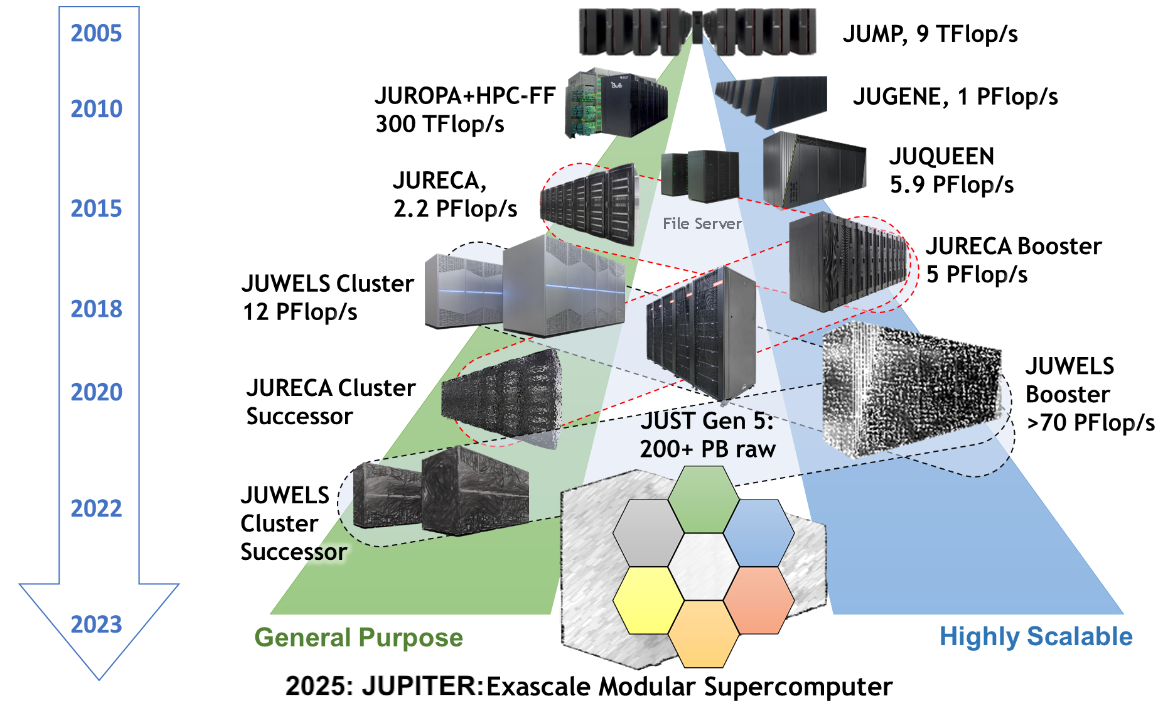
I/O is separate and shared
- All compute nodes of all supercomputers see the same files
- Performance tradeoff between shared accessibility and speed
- Our I/O server is almost a supercomputer by itself
![JSC Supercomputer Stragegy]()
Where do I keep my files?
Always store your code in the project1 folder (
$PROJECT_projectname). In our caseStore data in the scratch directory for faster I/O access (
$SCRATCH_projectname). ⚠️Files in scratch are deleted after 90 days of inactivity.Store the data in
$DATA_datasetfor a more permanent location.
Data loading
- We have CPUs and lots of memory - let’s use them
- If your dataset is relatively small (< 500 GB)
and can fit into the working memory (RAM) of each compute node (along
with the program state), you can store it in
/dev/shm. This is a special filesystem that uses RAM for storage, making it extremely fast for data access. ⚡️ - For bigger datasets (> 500 GB), you have many
strategies:
- Hierarchical Data Format 5 (HDF5)
- Apache Arrow
- NVIDIA Data Loading Library (DALI)
- SquashFS
Inodes
- Inodes (Index Nodes) are data structures that store metadata about files and directories.
- Unique identification of files and directories within the file system.
- Efficient management and retrieval of file metadata.
- Essential for file operations like opening, reading, and writing.
- Limitations:
- Fixed Number: Limited number of inodes; no new files if exhausted, even with free disk space.
- Space Consumption: Inodes consume
disk space, balancing is needed for efficiency.
![]()

Parallelize Training
Before Starting
If you have not done it already, clone the following repo:
What this code does
- It trains a Transformer language model on WikiText-2 dataset to predict the next word in a sequence.
- Transformers is a deep learning model architecture that uses self-attention to process sequences in parallel.
- WikiText-2 is a word-level language modeling dataset consisting of over 2 million tokens extracted from high-quality Wikipedia articles.
What this code does
Again, this is not a deep learning course.
If you are not familiar with the model and the dataset, just imagine it as a black box: you provide it with text, and it generates another text.
![]()

Libraries
- You already downloaded the libraries yesterday that
we will use today:
- PyTorch: A deep learning framework for building and training models.
- datasets A library from Hugging Face used to access, load, process, and share large datasets.
Let’s have a look at the files
train/to_distributed_training.py and
to_distributed_training.sbatch in the
repo.

Run the Training Script
There are TODOs in these two files. Do not modify the TODOs for now. The code is already working, so you don’t need to make any changes at this point.
Now run:
Spoiler alert 🚨
The code won’t work.
Check the output and error files
What is the problem?
- Remember, there is no internet on the compute node.
- Therefore, you should:
Comment out lines 78 to 153.
Activate your environment:
Run:
Uncomment back lines 78-153.
Finally, run your job again 🚀:
JOB Running
- Congrats, you are training a DL model on the supercomputer using one GPU 🎉
Tensorboard and Weights & Biases (WANDB)
- You can review the losses logged during training
Activate the Environment
If you haven’t already, activate your environment:
Tensorboard and wandb
Check the Metrics
You can visualize the metrics using one of the following options:
TensorBoard
Open the link provided by VS Code.
Weights & Biases (wandb)
Open the link displayed in the terminal.
llview
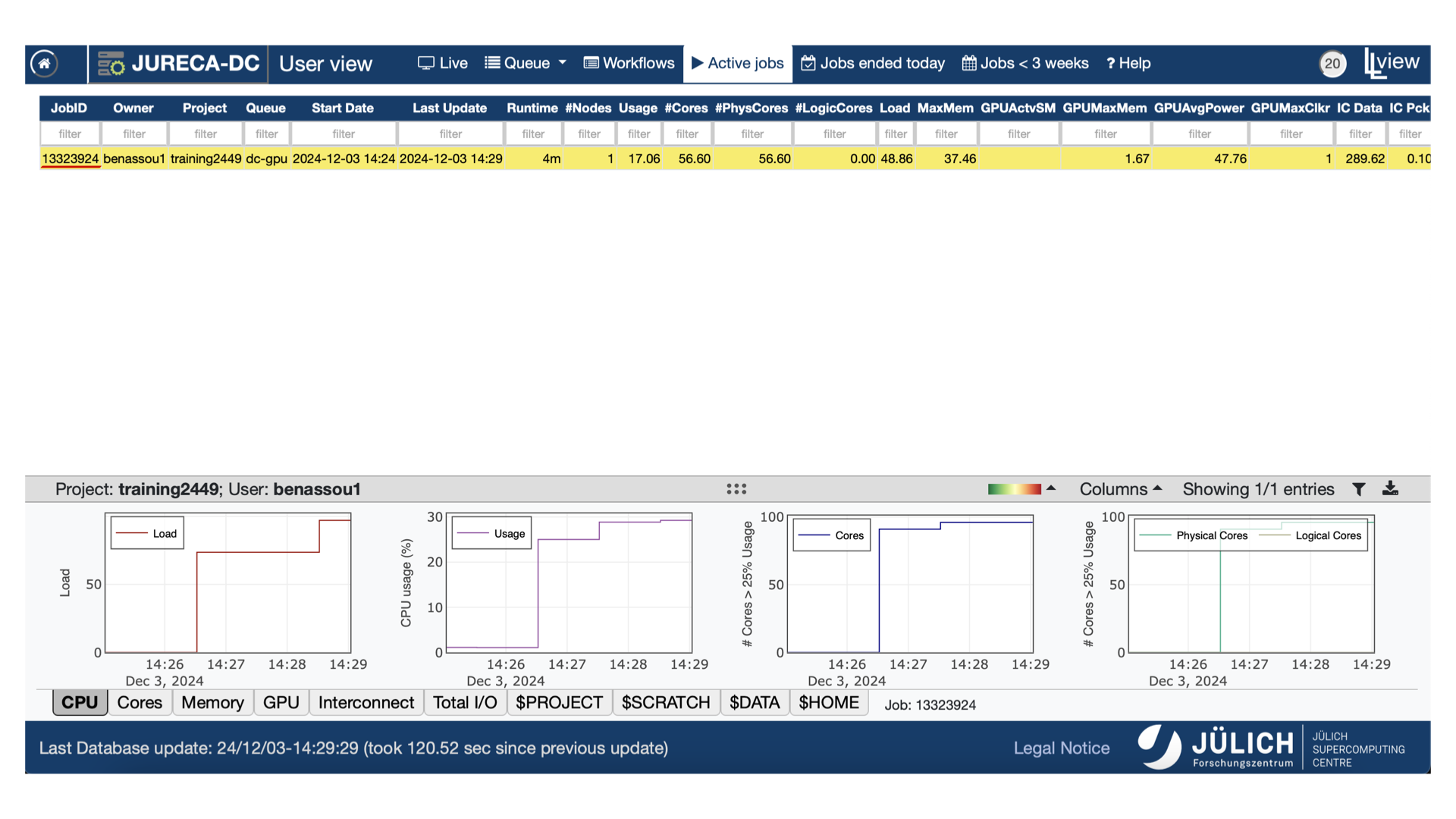
- You can monitor your training using llview.
- Use your Judoor credentials to connect.
- Check the job number that you are intrested in.
![]()
llview
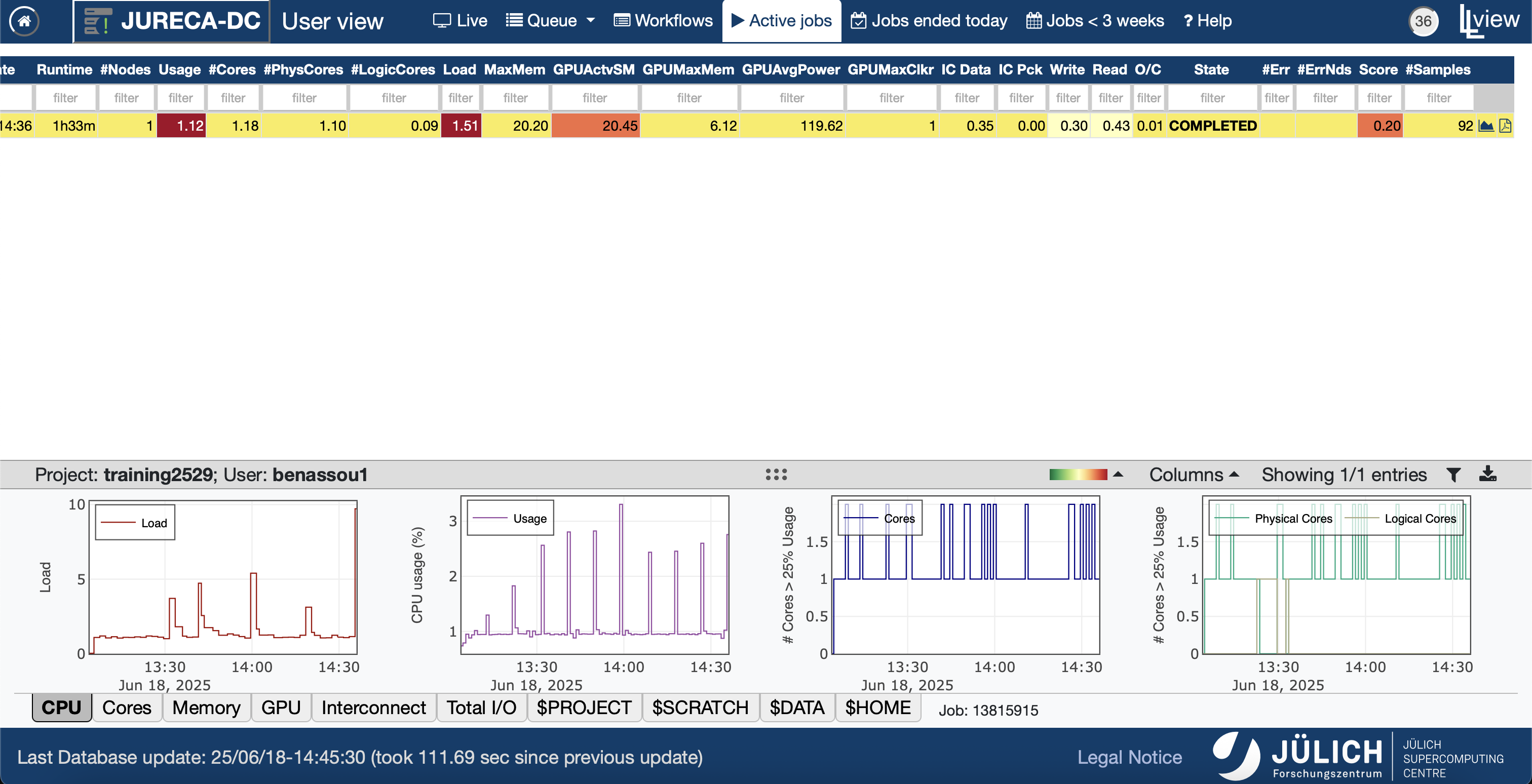
- Go to the right to open the PDF document.
It may take some time to load the job information, so please
wait until the icon turns blue.
![]()
llview
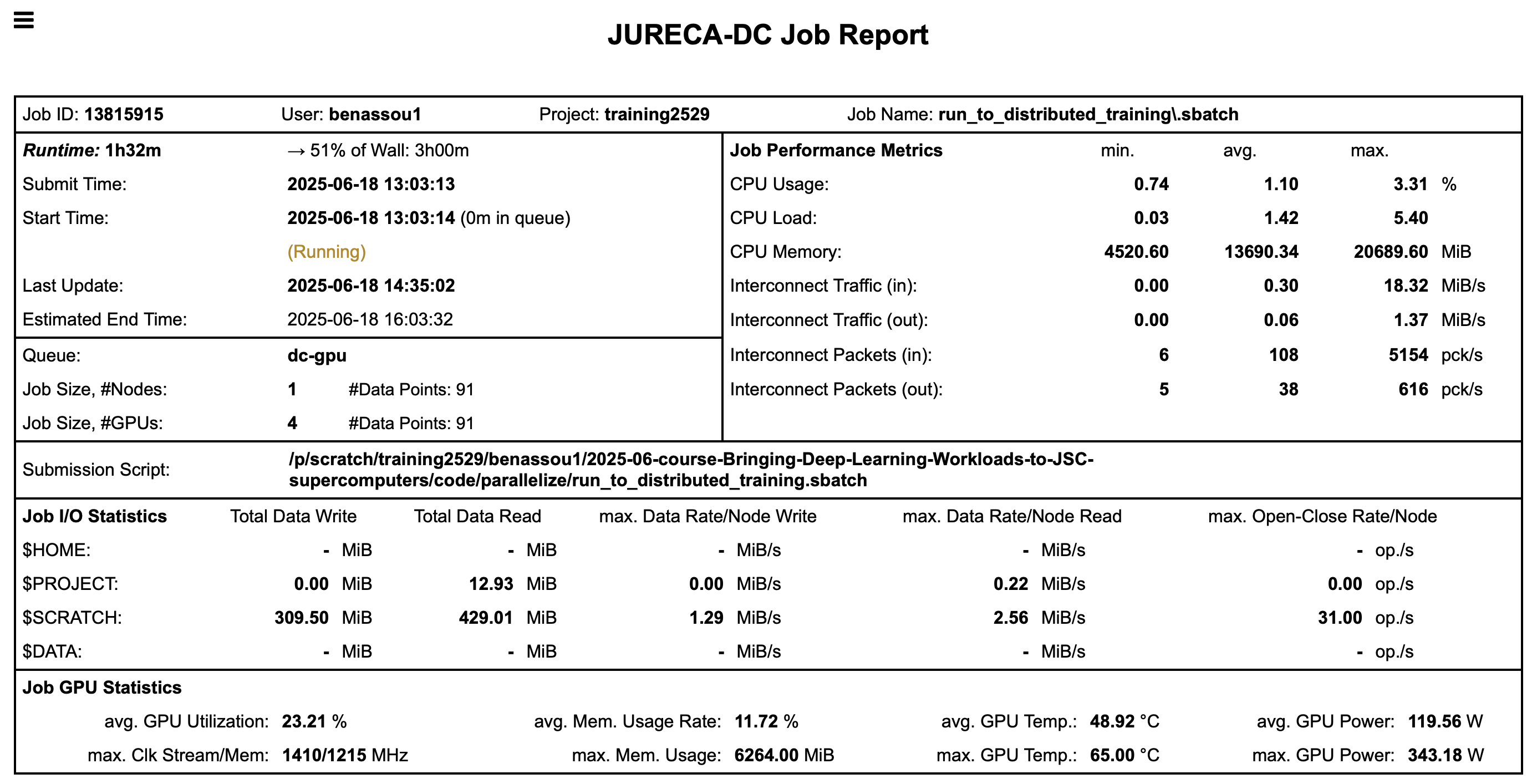
- You have many information about your job once you
open the PDF file.
![]()
GPU utilization
You can see that in fact we are using 1 GPU
![]()
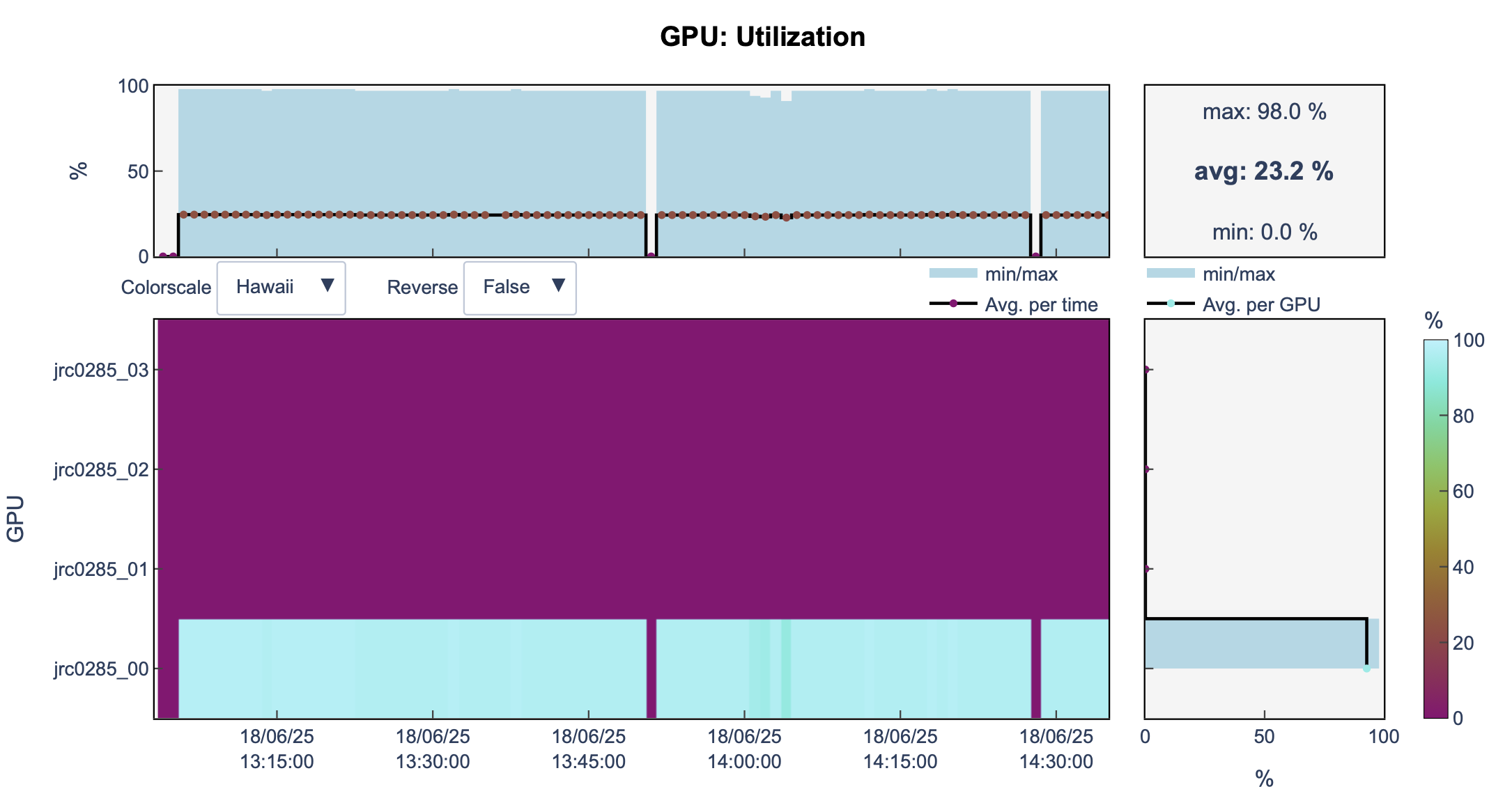
GPU utilization
It is a waste of resources.
The training takes time (1h32m according to llview).
Then, can we run our model on multiple GPUs ?
What if
At line 3 in file
to_distributed_training.sbatch, we increase the number of GPUs to 4:And run our job again
llview
- We are still using 1 GPU
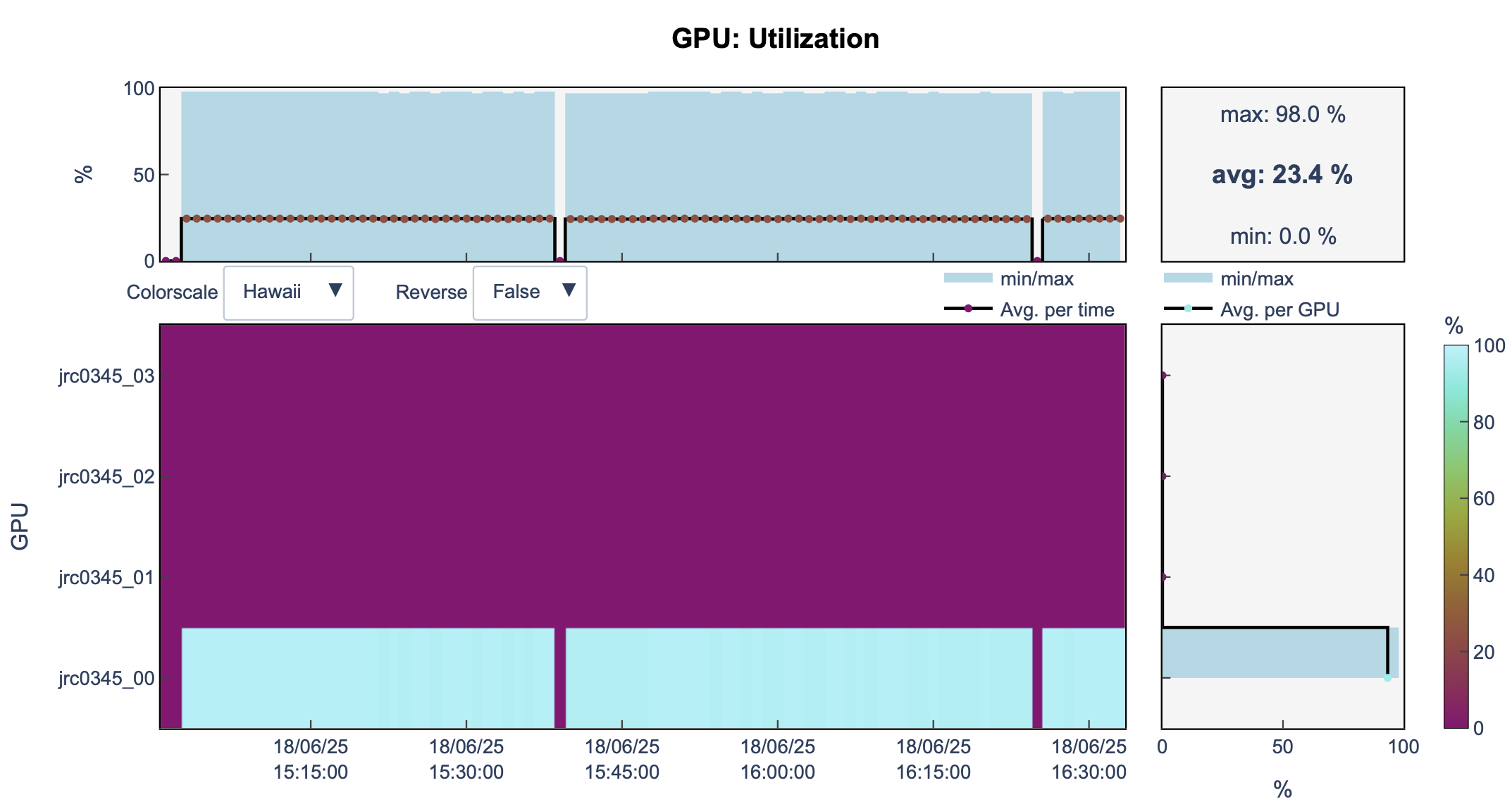
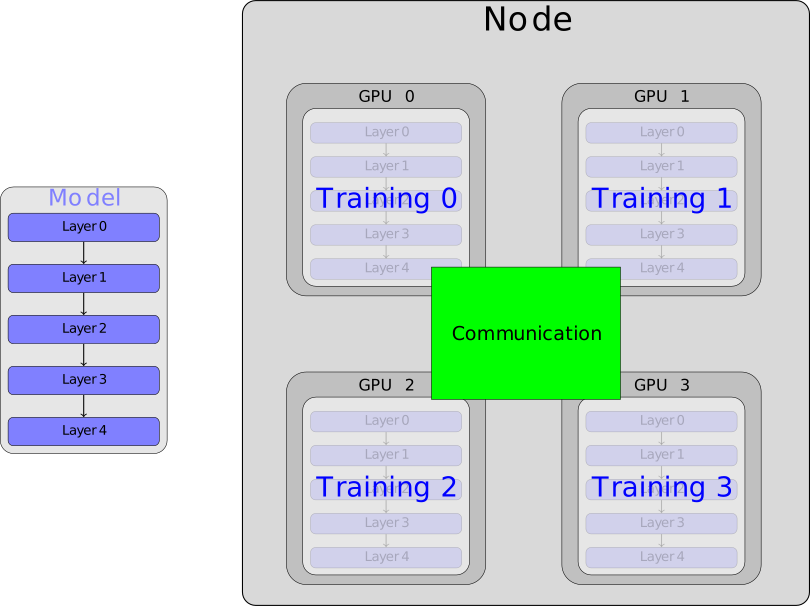
We need communication
Without correct setup, the GPUs might not be utilized.
Furthermore, we don’t have an established communication between the GPUs
![]()
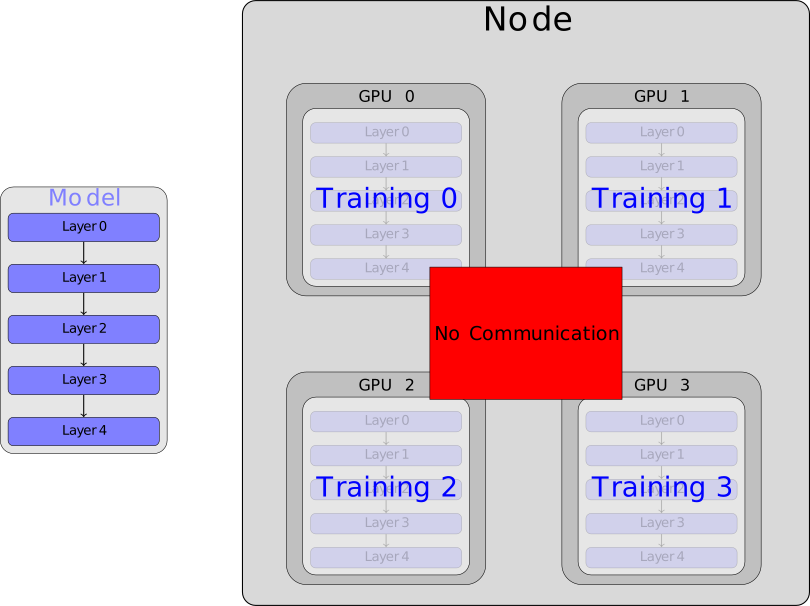
We need communication
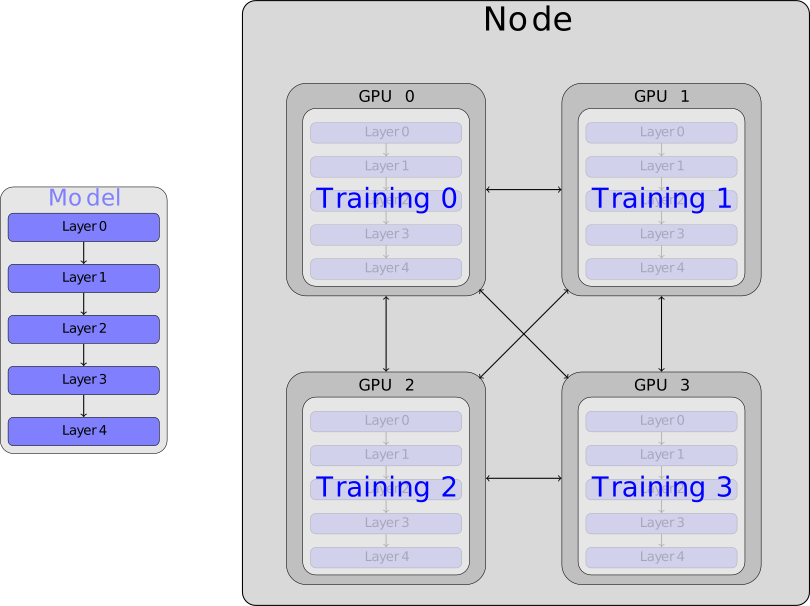
We need communication
collective operations
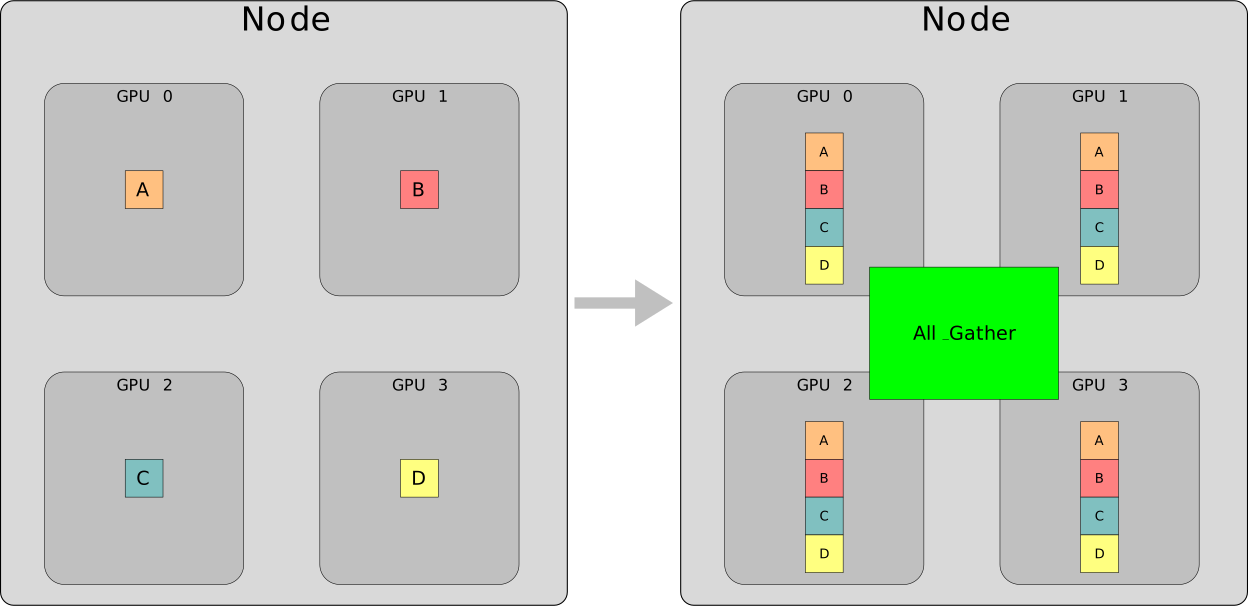
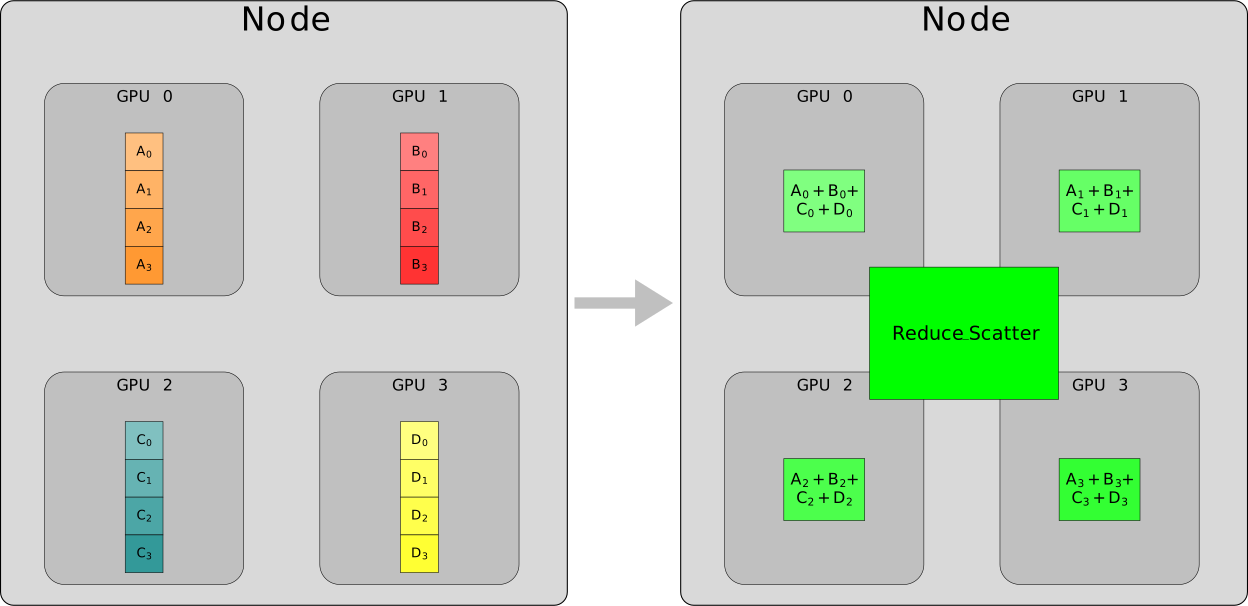
- The GPUs use collective operations to communicate and share data in parallel computing
- The most common collective operations are: All Reduce, All Gather, and Reduce Scatter
All Reduce
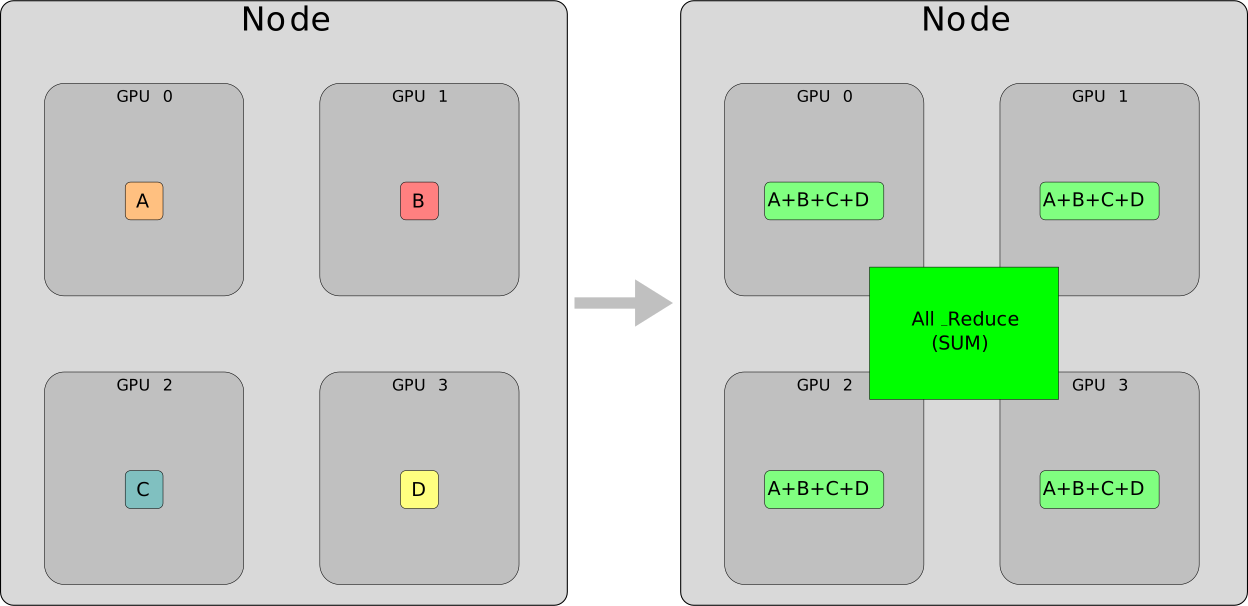
- Other operations, such as min, max, and avg, can also be performed using All-Reduce.
All Gather
Reduce Scatter
Terminologies
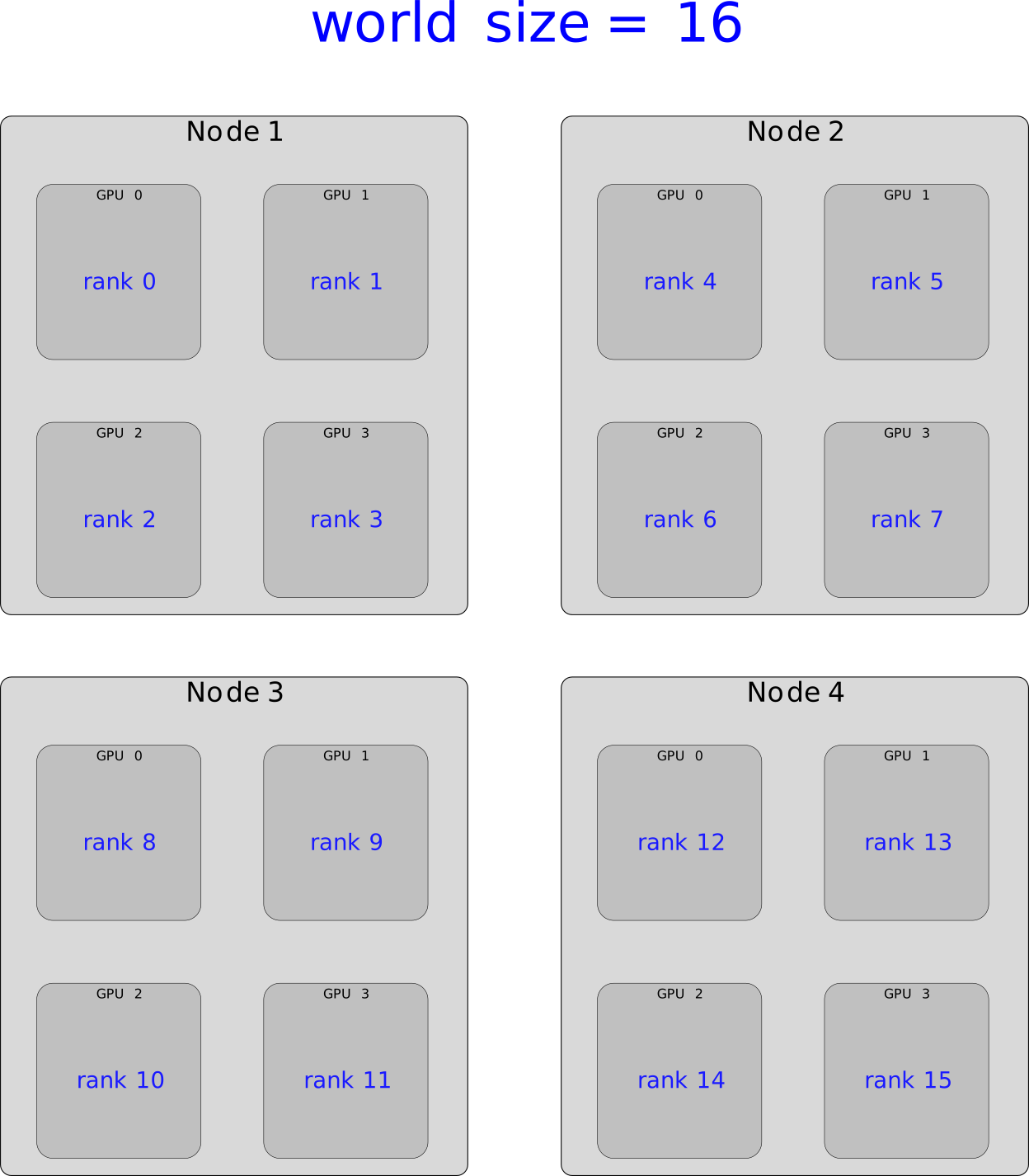
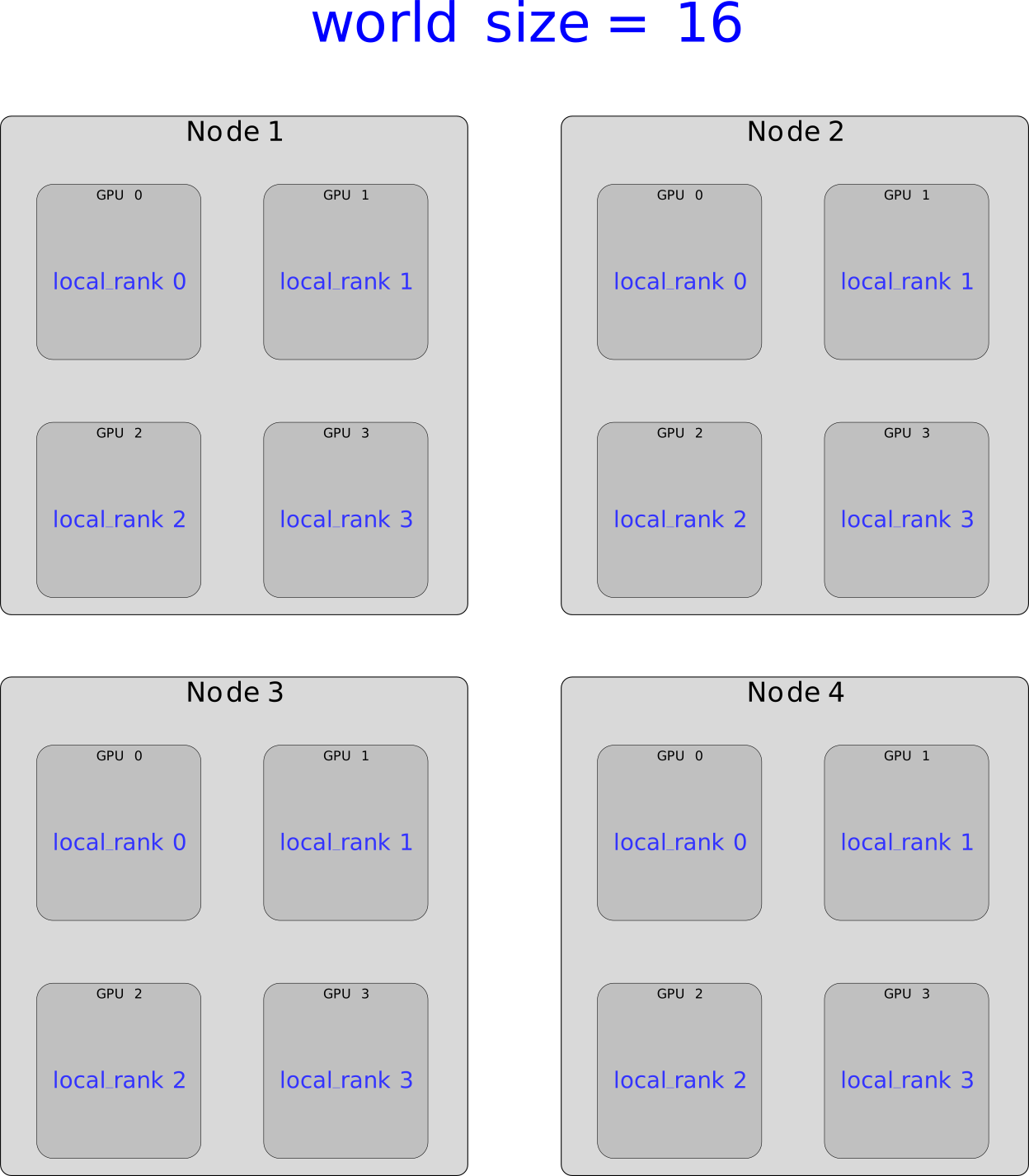
- Before going further, we need to learn some terminologies
World Size
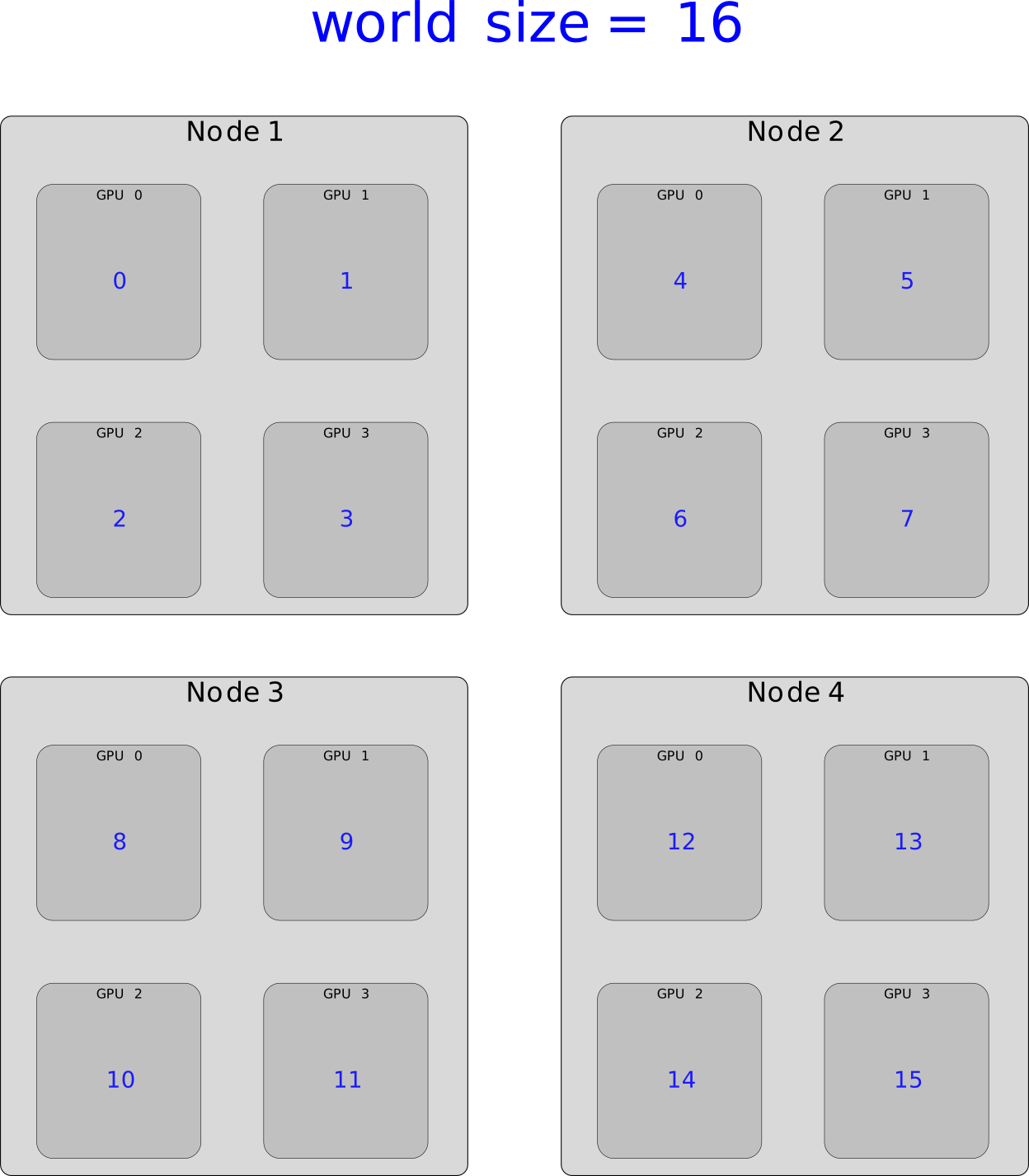
Rank
local_rank
Now
That we have understood how the devices communicate and the terminologies used in parallel computing, we can move on to distributed training (training on multiple GPUs).
Distributed Training
- Parallelize the training across multiple nodes,
- Significantly enhancing training speed and model accuracy.
- It is particularly beneficial for large models and computationally intensive tasks, such as deep learning.[1]
Distributed Data Parallel (DDP)
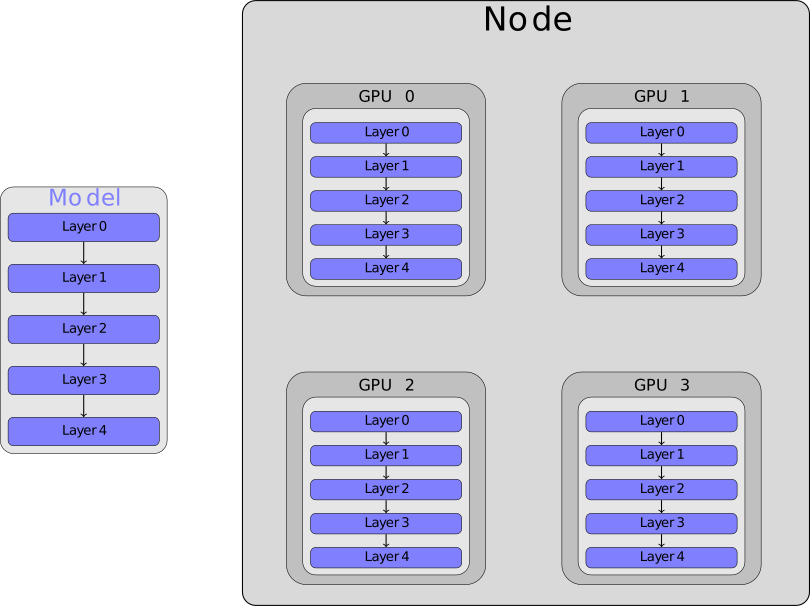
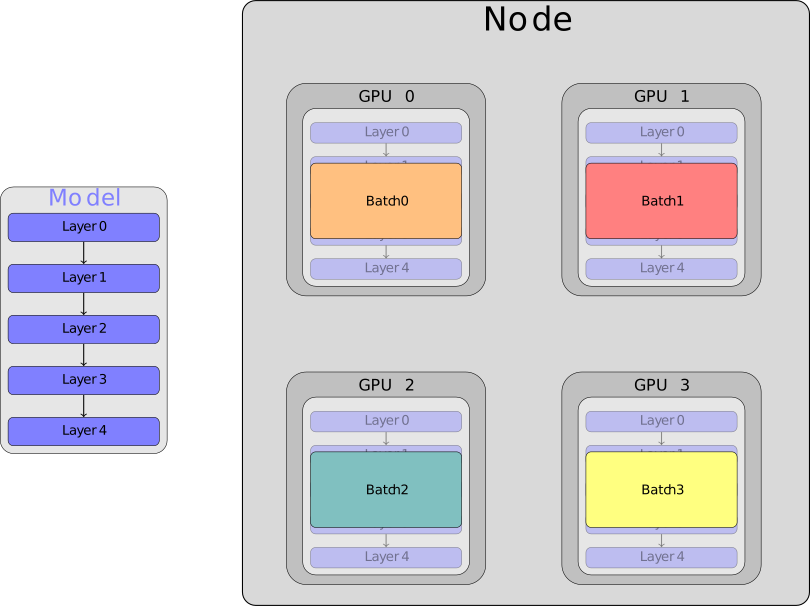
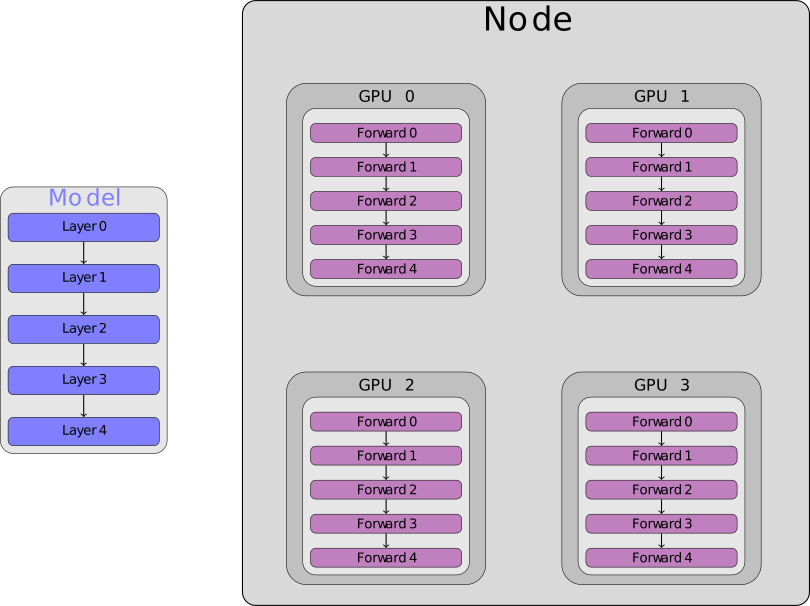
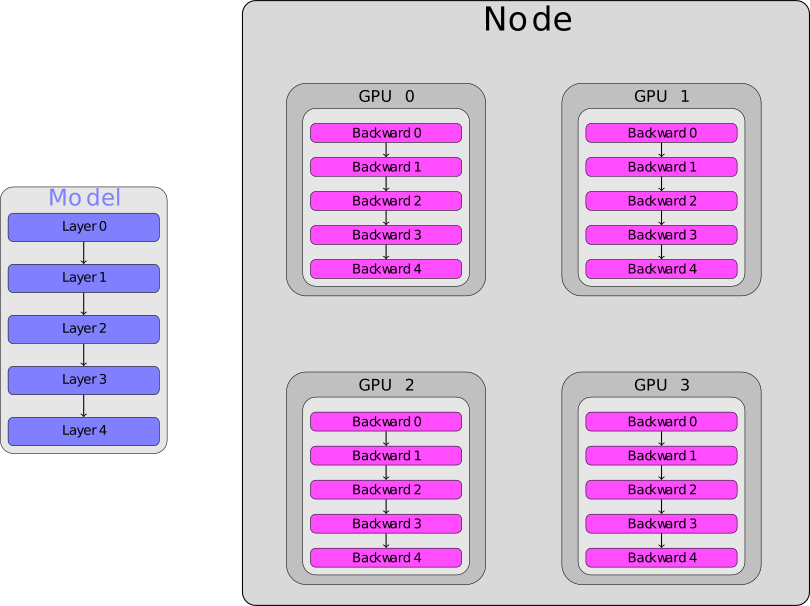
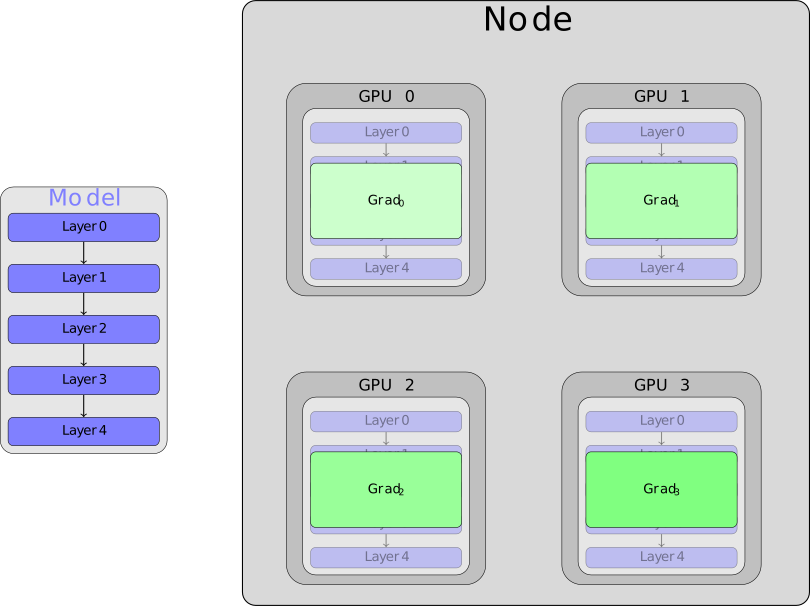
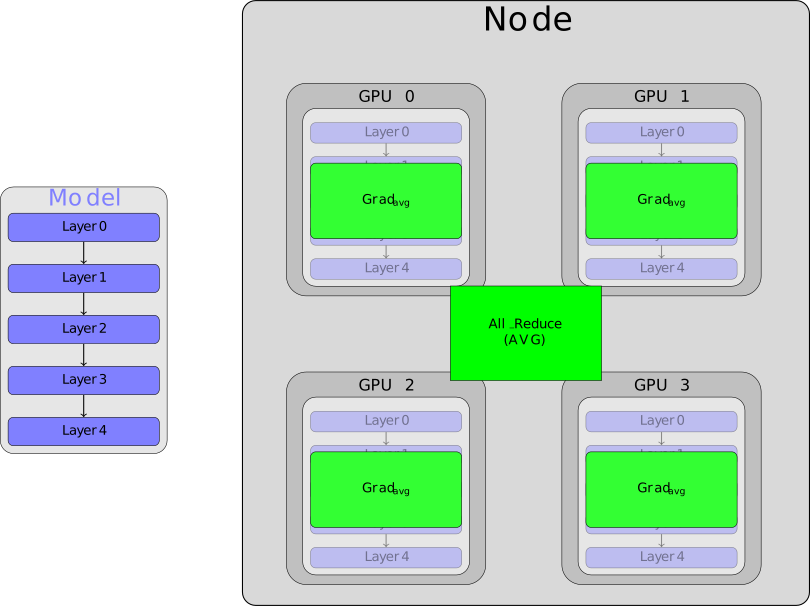
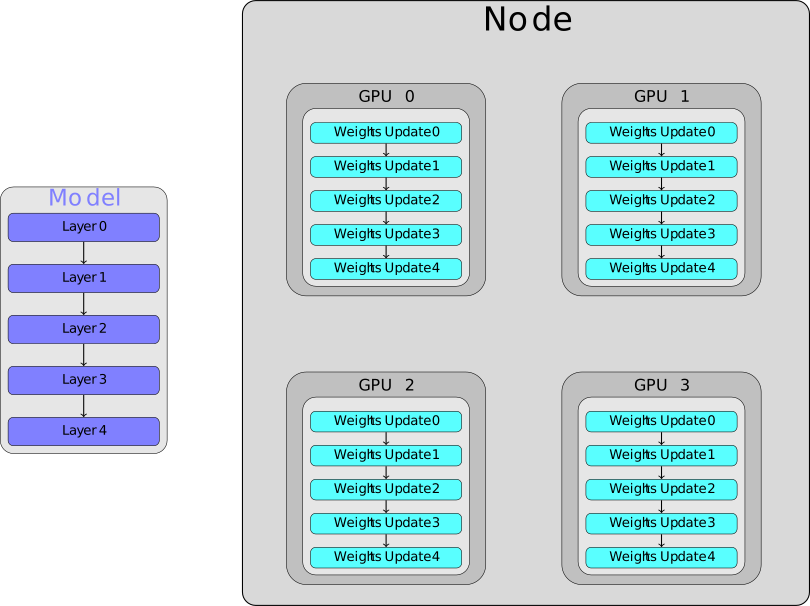
DDP is a method in parallel computing used to train deep learning models across multiple GPUs or nodes efficiently.
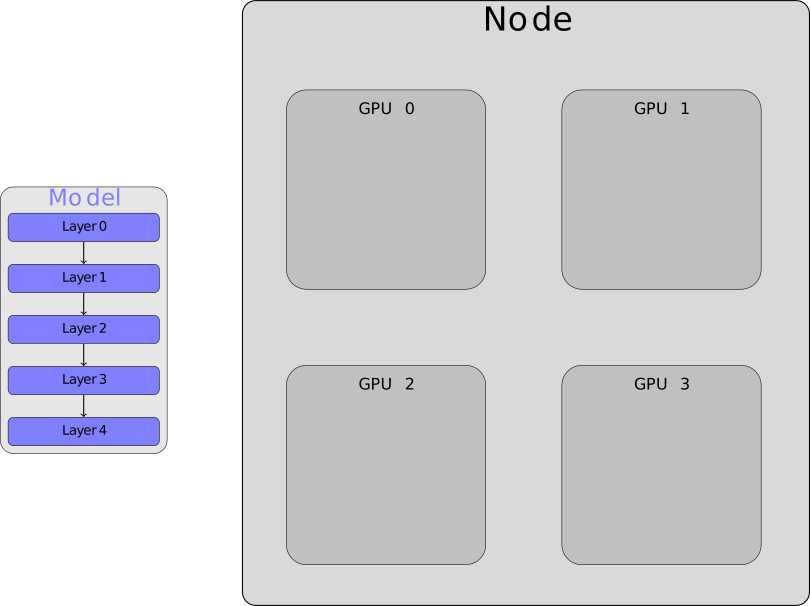
DDP
DDP
DDP
DDP
DDP
DDP
DDP
DDP
If you’re scaling DDP to use multiple nodes, the underlying principle remains the same as single-node multi-GPU training.
DDP
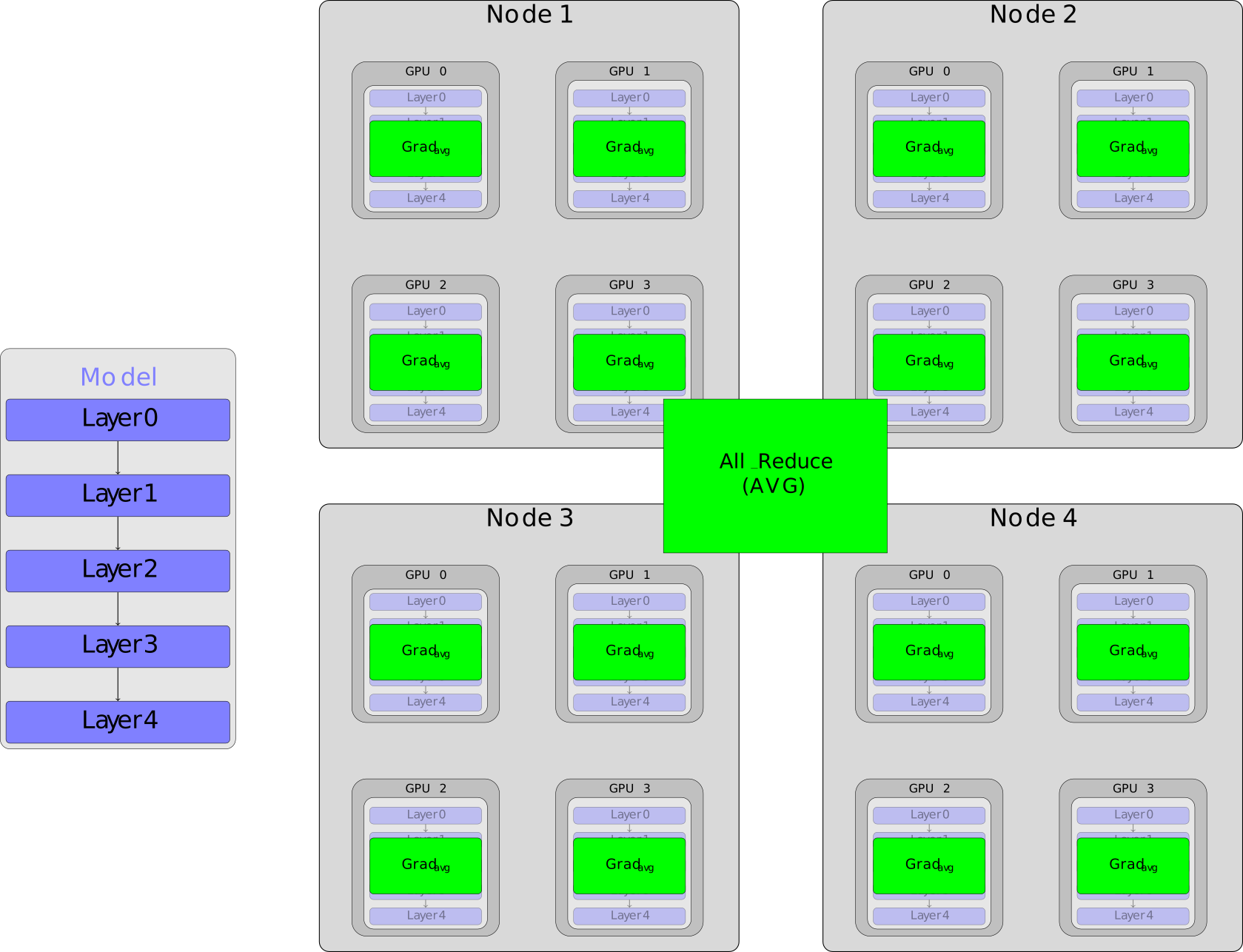
DDP recap
- Each GPU on each node gets its own process.
- Each GPU has a copy of the model.
- Each GPU has visibility into a subset of the overall dataset and will only see that subset.
- Each process performs a full forward and backward pass in parallel and calculates its gradients.
- The gradients are synchronized and averaged across all processes.
- Each process updates its optimizer.
Let’s start coding!
Whenever you see TODOs💻📝, follow the instructions to either copy-paste the code at the specified line numbers or type it yourself.
Depending on how you copy and paste, the line numbers may vary, but always refer to the TODO numbers in the code and slides.
Setup communication
- We need to setup a communication among the GPUs.
- For that we would need the file
distributed_utils.py. - TODOs💻📝:
Import
distributed_utilsfile at line 11:Then remove lines 67 and 68:
and add at line 67 a call to the method
setup()defined indistributed_utils.py:
Setup communication
What is in the setup() method ?
def setup():

    # Initializes a communication group using 'nccl' as the backend for GPU communication.
    torch.distributed.init_process_group(backend='nccl')

    # Get the identifier of each process within a node
    local_rank = int(os.getenv('LOCAL_RANK'))

    # Get the total number of processes in the distributed system
    world_size = int(os.getenv('WORLD_SIZE'))

    # Get the global identifier of each process within the distributed system
    rank = int(os.environ['RANK'])

    # Creates a torch.device object that represents the GPU to be used by this process.
    device = torch.device('cuda', local_rank)
    # Sets the default CUDA device for the current process,
    # ensuring all subsequent CUDA operations are performed on the specified GPU device.
    torch.cuda.set_device(device)

    # Different random seed for each process.
    torch.random.manual_seed(1000 + torch.distributed.get_rank())

    return local_rank, rank, device, world_size
DistributedSampler
TODO 4💻📝:
At line 78, instantiate a DistributedSampler object for each set to ensure that each process gets a different subset of the data.
# DistributedSampler object for each set to ensure that each process gets a different subset of the data.
train_sampler = torch.utils.data.distributed.DistributedSampler(train_dataset,
                                                                shuffle=True,
                                                                seed=args.seed)
val_sampler = torch.utils.data.distributed.DistributedSampler(val_dataset)
test_sampler = torch.utils.data.distributed.DistributedSampler(test_dataset)
DataLoader
TODO 5💻📝:
At line 87, REMOVE
shuffle=Truein the DataLoader of train_loader and REPLACE it bysampler=train_sampler
DataLoader
TODO 6💻📝:
At line 92, pass val_sampler to the sampler argument of the val_dataLoader
TODO 7💻📝:
At line 96, pass test_sampler to the sampler argument of the test_dataLoader
Model
TODO 8💻📝:
At line 112, wrap the model in a DistributedDataParallel (DDP) module to parallelize the training across multiple GPUs.
Sampler
TODO 9💻📝:
At line 129, set the current epoch for the dataset sampler to ensure proper data shuffling in each epoch
All Reduce Operation
TODO 10💻📝:
At lines 38 and 60, Obtain the global average loss across the GPUs.
TODO 11💻📝:
Replace all the
printmethods byprint0method defined indistributed_utils.pyto allow only rank 0 to print in the output file.At line 135
At line 150
The definition of the function print0 is in
distributed_utils.py
Save model
TODO 12💻📝:
At lines 145 and 154, replace torch.save method with the utility function save0 to allow only the process with rank 0 to save the model.
Save model
The method save0 is defined in
distributed_utils.py
functools.lru_cache(maxsize=None)
def is_root_process():
    """Return whether this process is the root process."""
    return torch.distributed.get_rank() == 0


def save0(*args, **kwargs):
    """Pass the given arguments to `torch.save`, but only on the root
    process.
    """
    # We do *not* want to write to the same location with multiple
    # processes at the same time.
    if is_root_process():
        torch.save(*args, **kwargs)
Destroy Process Group
TODO 13💻📝:
At line 160, destroy every process group and backend by calling destroy_process_group()
Destroy Process Group
The method destroy_process_group is defined in
distributed_utils.py
We are almost there
- That’s it for the train/to_distributed_training.py file.
- But before launching our job, we need to add some lines to to_distributed_training.sbatch file
Setup communication
In to_distributed_training.sbatch
file:
- TODOs 14💻📝:
At line 3, increase the number of GPUs to 4 if it is not already done.
At line 23, pass the correct number of devices.
Setup communication
Stay in to_distributed_training.sbatch
file:
TODO 15💻📝: we need to setup MASTER_ADDR and MASTER_PORT to allow communication over the system.
At line 26, add the following:
# Extracts the first hostname from the list of allocated nodes to use as the master address.
MASTER_ADDR="$(scontrol show hostnames "$SLURM_JOB_NODELIST" | head -n 1)"
# Modifies the master address to allow communication over InfiniBand cells.
MASTER_ADDR="${MASTER_ADDR}i"
# Get IP for hostname.
export MASTER_ADDR="$(nslookup "$MASTER_ADDR" | grep -oP '(?<=Address: ).*')"
export MASTER_PORT=7010
Setup communication
We are not done yet with
to_distributed_training.sbatch file:
TODO 16💻📝:
We remove the lauching script at line 48:
We use torchrun instead to launch our training and pass the following argument:
# Launch a distributed training job across multiple nodes and GPUs
srun --cpu_bind=none bash -c "torchrun \
    --nnodes=$SLURM_NNODES \
    --rdzv_backend c10d \
    --nproc_per_node=gpu \
    --rdzv_id $RANDOM \
    --rdzv_endpoint=$MASTER_ADDR:$MASTER_PORT \
    --rdzv_conf=is_host=\$(if ((SLURM_NODEID)); then echo 0; else echo 1; fi) \
    train/to_distributed_training.py "
Setup communication
The arguments that we pass are:
nnodes=$SLURM_NNODES: the number of nodesrdzv_backend c10d: the c10d method for coordinating the setup of communication among distributed processes.nproc_per_node=gputhe number of GPUsrdzv_id $RANDOMa random id which that acts as a central point for initializing and coordinating the communication among different nodes participating in the distributed training.rdzv_endpoint=$MASTER_ADDR:$MASTER_PORTthe IP that we setup in the previous slide to ensure all nodes know where to connect to start the training session.rdzv_conf=is_host=\$(if ((SLURM_NODEID)); then echo 0; else echo 1; fi)The rendezvous host which is responsible for coordinating the initial setup of communication among the nodes.
done ✅
You can finally run:
llview
Let’s have a look at our job using llview again.
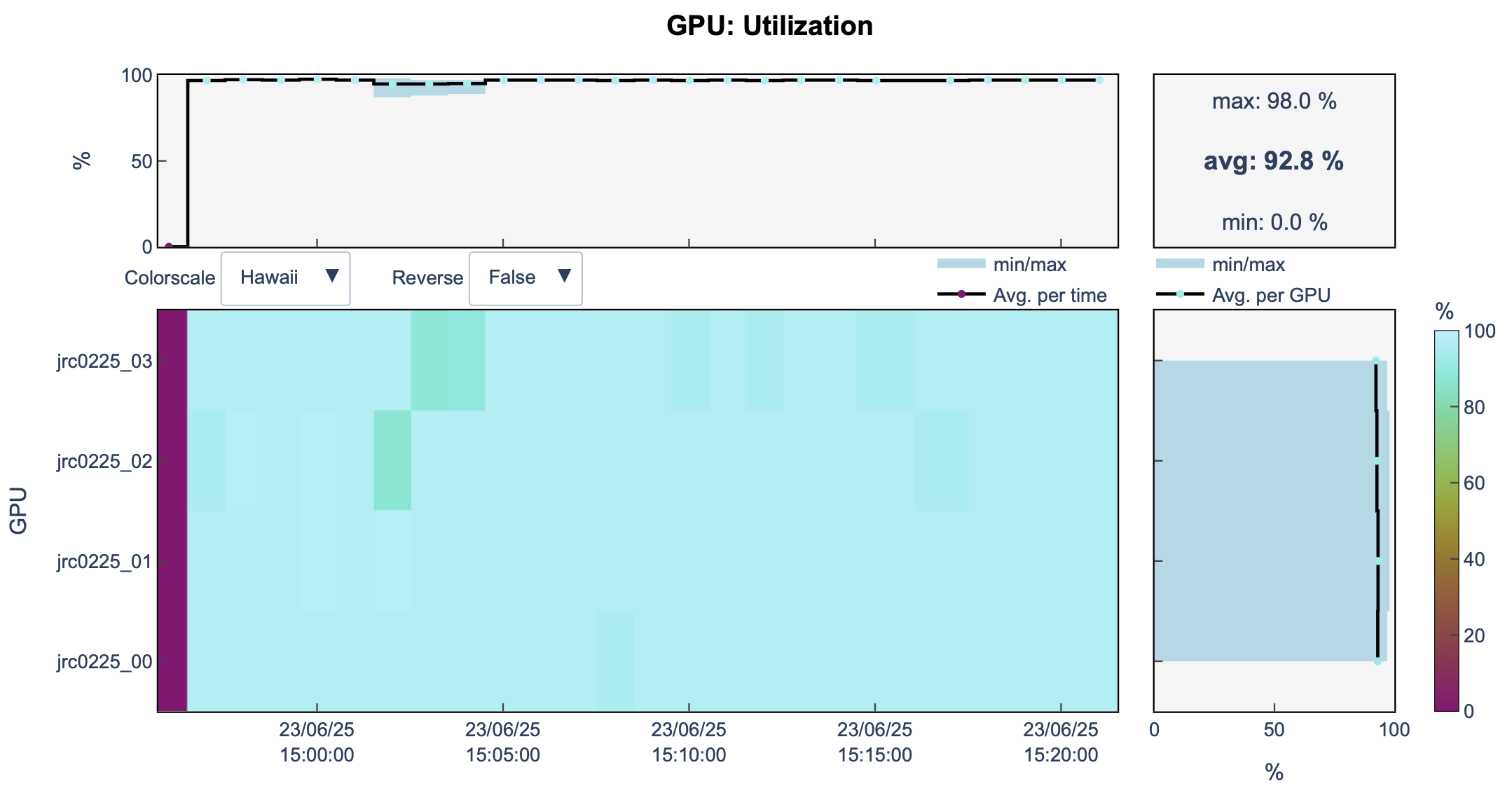
You can see that now, we are using all the GPUs of the node
![]()
llview
And that our job took less time to finish training (25m vs 1h32m with one GPU)
But what about using more nodes ?
What about using more nodes ?
Multi-node training
TODO 17💻📝: in
to_distributed_training.sbatchat line 2, you can increase the number of nodes to 2:Hence, you will use 8 GPUs for training.
Run again:
llview
Open llview again.
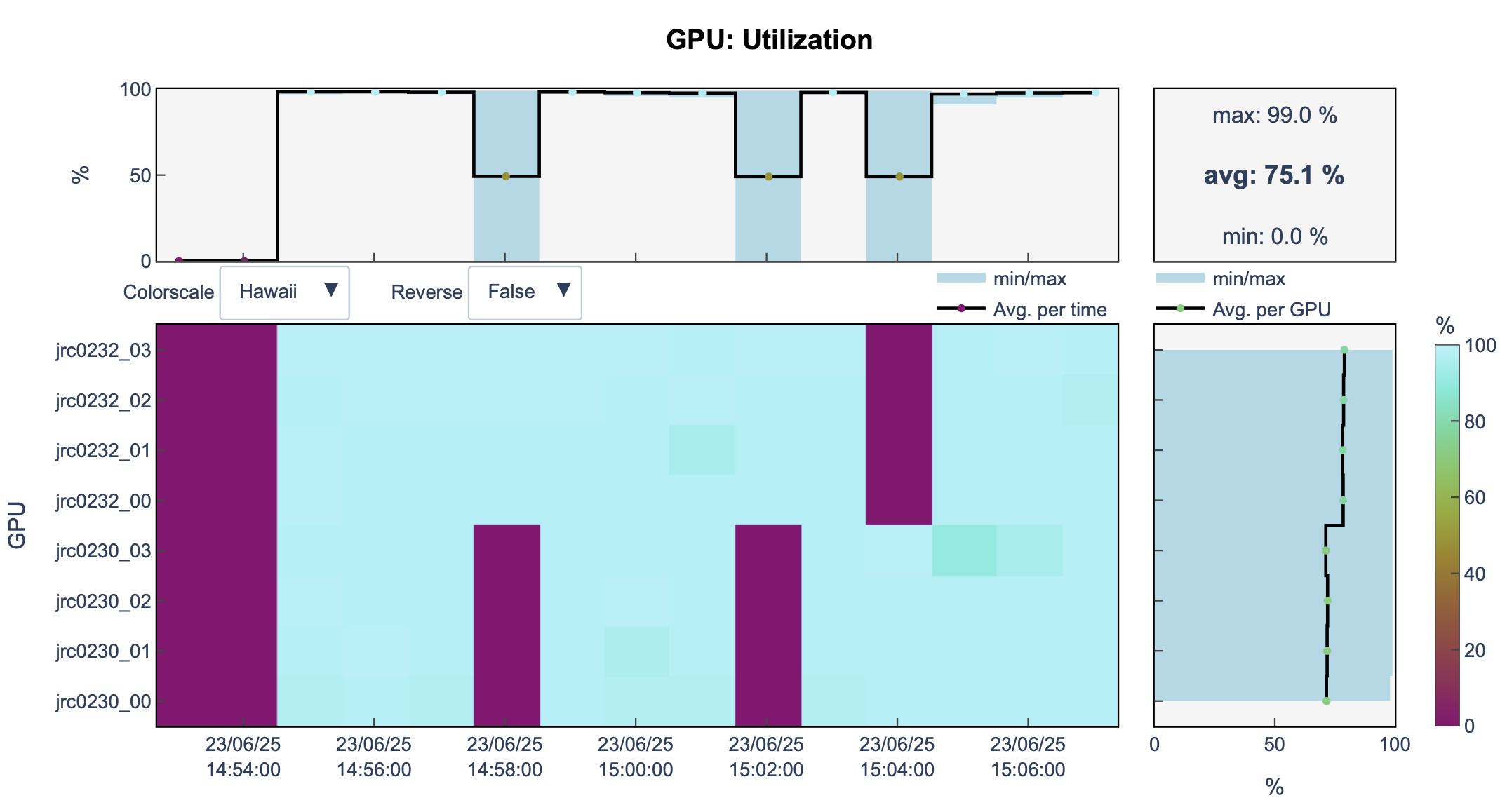
You can see that now, we are using 2 nodes and 8 GPUs.
![]()
And the training took less time (14m)
Amazing ✨
DDP with PYTORCH LIGHTNING (PL)
To use DDP with PL, we need to make some changes to the model code and the sbatch file, and create a new main file. You can find all these changes in:
model/transformerLM.pytrain/Lit_training.pyLit_training.sbatch
Before we go further…
- Distributed Data parallel is usually good enough 👌
- However, if your model is too big to fit into a single GPU
- Welllll … there are other distributed techniques …
Fully Sharded Data Parallel (FSDP)
FSDP
FSDP
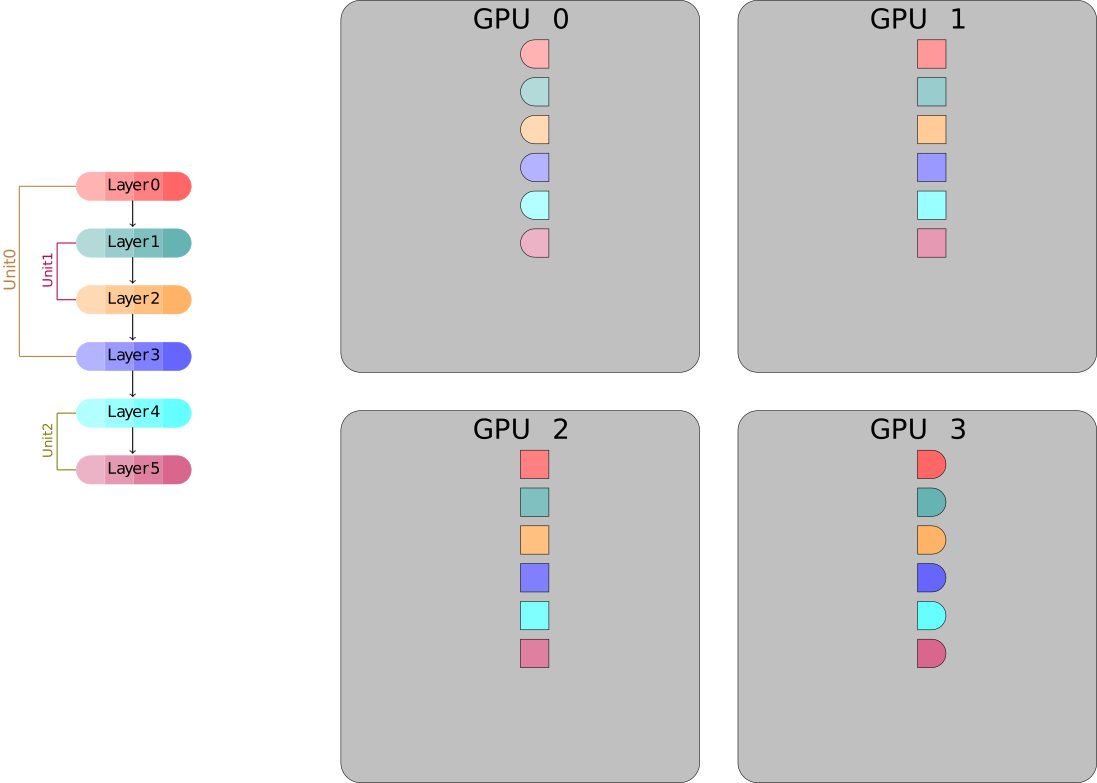
FSDP
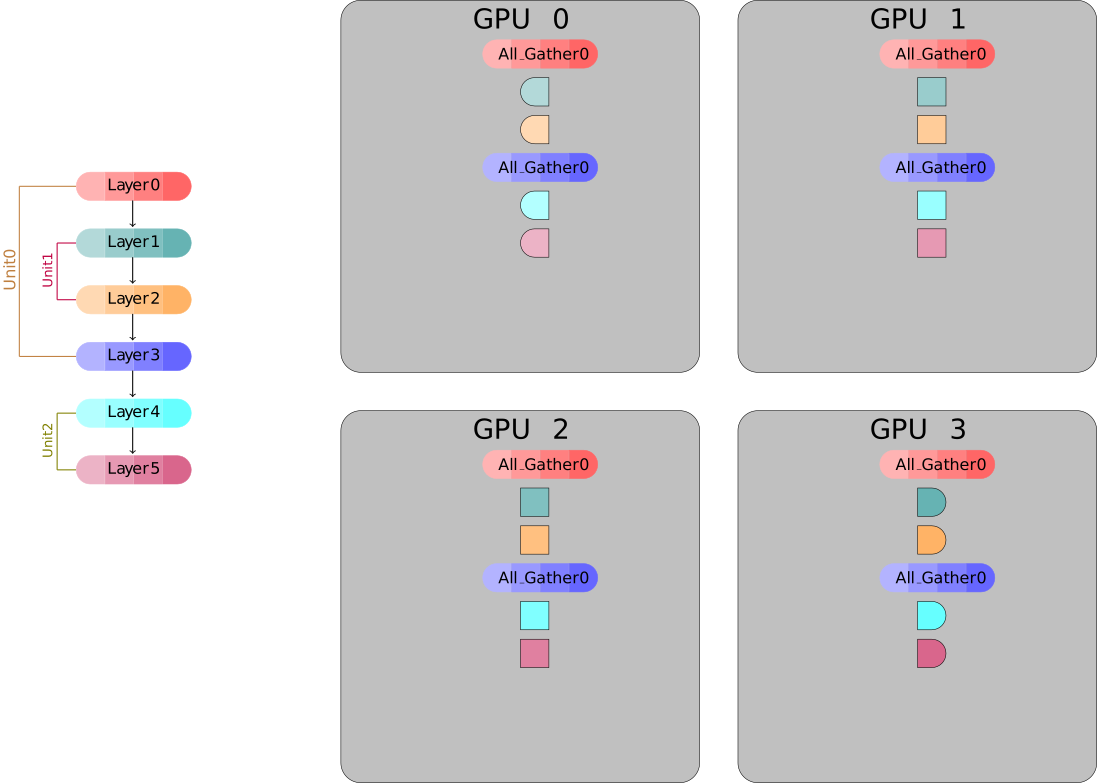
FSDP
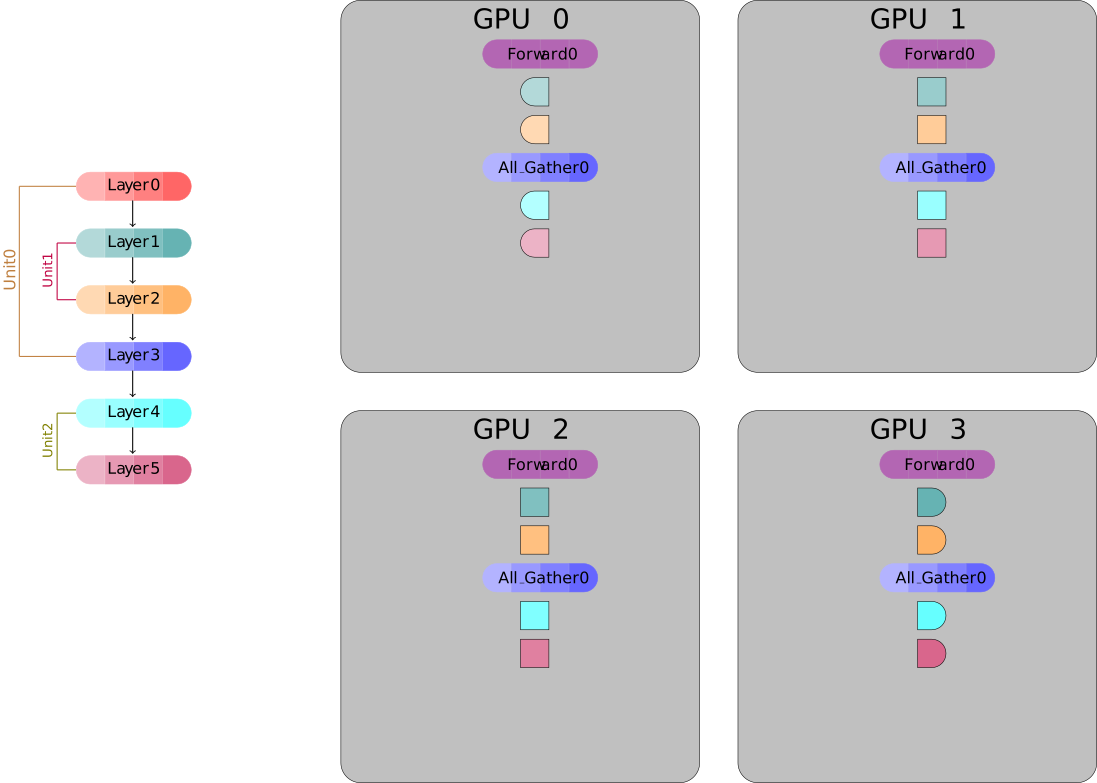
FSDP
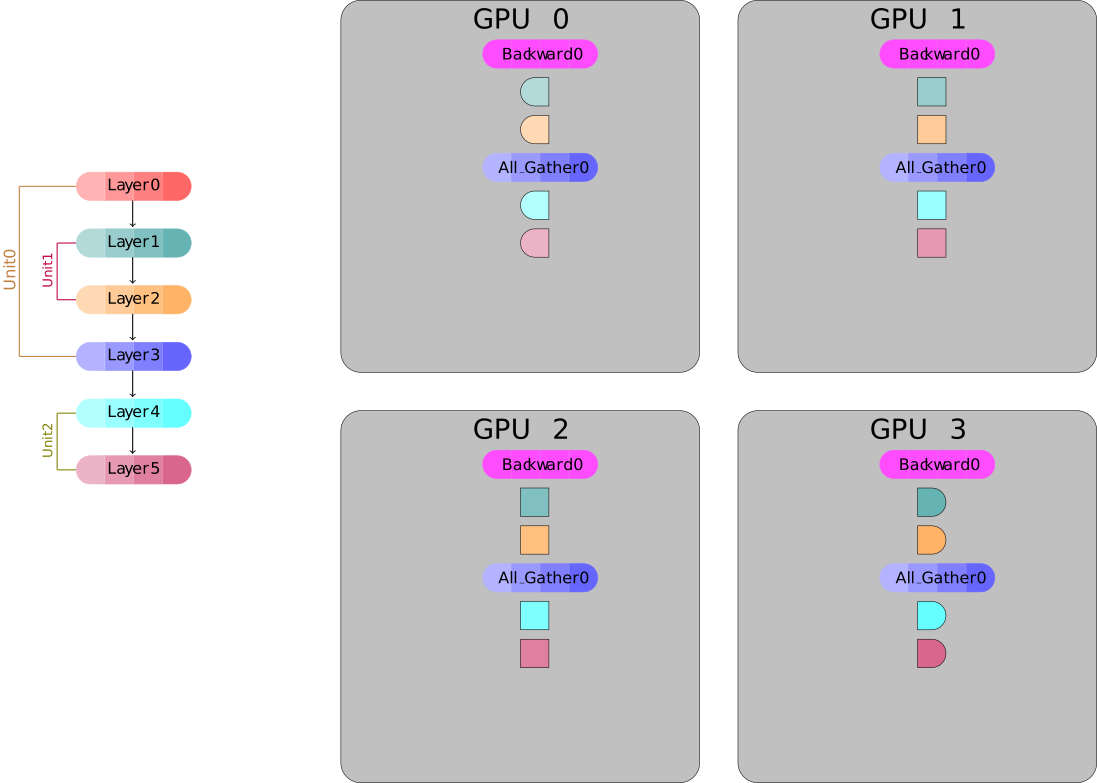
FSDP
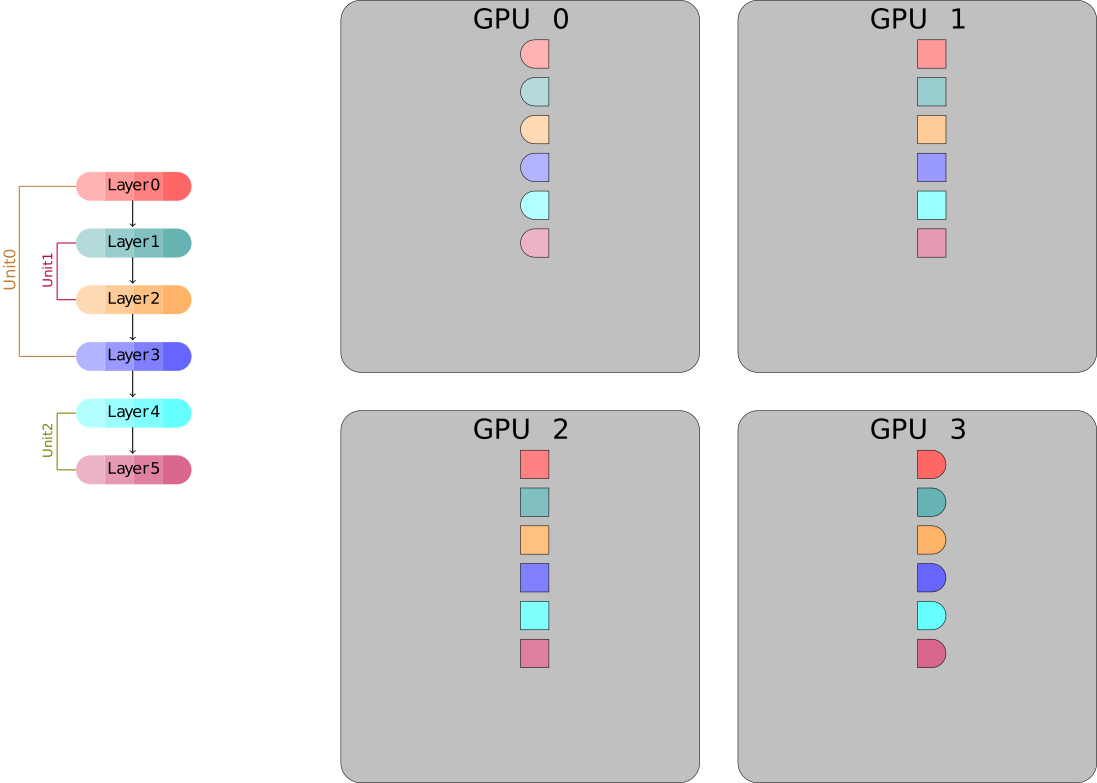
FSDP workflow
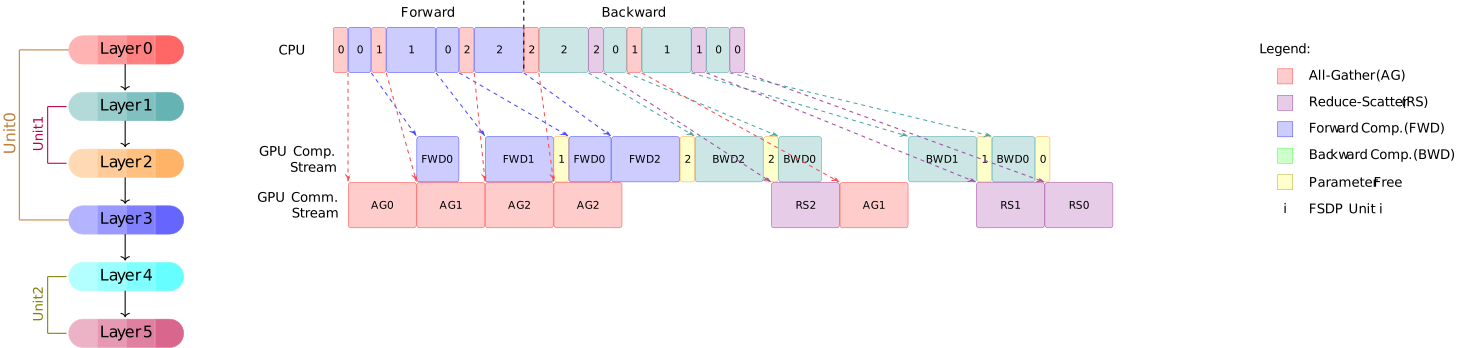
Let’s convert our DDP training Code to FSDP
Wrap the model AGAIN
TODO 17💻📝: Delete lines 111–116 that wrap the model in DistributedDataParallel, and instead wrap the model using torch.distributed.fsdp.
# Unlike DDP, we should apply fully_shard to both submodules and the root model.
# Here, we apply fully_shard to each TransformerEncoder and TransformerDecoder block,
# and then to the root model.
fsdp_kwargs = {}
for module in model.modules():
    if isinstance(module, (
            torch.nn.TransformerEncoder,
            torch.nn.TransformerDecoder,)
        ):
        # Each TransformerEncoder and TransformerDecoder block is treated as a separate FSDP unit.
        torch.distributed.fsdp.fully_shard(module, **fsdp_kwargs)

# Identifies all parameters not already wrapped and groups them into a shardable unit.
torch.distributed.fsdp.fully_shard(model, **fsdp_kwargs)
Save Model state
- TODO 18💻📝:
Remove lines 152 to 154 and replace them with:
Remove lines 160 to 162 and replace them with:
How the model is saved
We can either save the full model state, as we did with DDP, or save the sharded model state. We can also choose to save the optimizer state.
The relevant methods can be found in the distributed_utils.py file.
To save the sharded model, we use DCP.
What is DCP
Distributed Checkpoint (DCP) support loading and saving models from multiple ranks in parallel. It supports load-time resharding, which means a model can be saved using one cluster configuration (e.g., number of GPUs or nodes) and later loaded using a different configuration, without requiring the checkpoint to be rewritten.
DCP is different than torch.save and torch.load in a few significant ways:
- It produces multiple files per checkpoint, with at least one per rank.
- It operates in place, meaning that the model should allocate its data first and DCP uses that storage instead.
Save full model state
We use get_model_state_dict method with full_state_dict=True and cpu_offload=True to all-gathers tensors and offload them to CPU. No ShardedTensor will be in the returned state_dict.
def save_full_model(model, optimizer=None, *args, **kwargs):
    """Stream all model parameters to rank 0 on the CPU, then pass all
    other given arguments to `torch.save` to save the model, but only on
    the root process.
    """
    state_dict_options = dist_state_dict.StateDictOptions(
        full_state_dict=True,
        cpu_offload=True,
    )
    cpu_state_dict = dist_state_dict.get_model_state_dict(
        model,
        options=state_dict_options,
    )
    cpu_state = {'model': cpu_state_dict}
    if optimizer is not None:
        optim_state_dict = dist_state_dict.get_optimizer_state_dict(
            model,
            optimizer,
            options=state_dict_options,
        )
        cpu_state['optimizer'] = optim_state_dict
    save0(cpu_state, *args, **kwargs)
Save sharded model
class AppState(Stateful):
    def __init__(self, model, optimizer=None):
        self.model = model
        self.optimizer = optimizer

    def state_dict(self):
        # Automatically manages FSDP, as well as sets the default state dict type to FSDP.SHARDED_STATE_DICT
        model_state_dict, optimizer_state_dict = get_state_dict(self.model, self.optimizer)
        return {
            "model": model_state_dict,
            "optim": optimizer_state_dict
        }

    def load_state_dict(self, state_dict):
        # Sets our state dicts on the model and optimizer, now that we've loaded
        set_state_dict(
            self.model,
            self.optimizer,
            model_state_dict=state_dict["model"],
            optim_state_dict=state_dict["optim"]
        )

def save_sharded_model(model, optimizer=None, CHECKPOINT_DIR='checkpoints'):
    state_dict = { "app": AppState(model, optimizer) }
    dcp.save(state_dict, checkpoint_id=CHECKPOINT_DIR)
Run your training
You can run the same sbatch file without any modification.
llview
Let’s have a look at llview again:
![]()
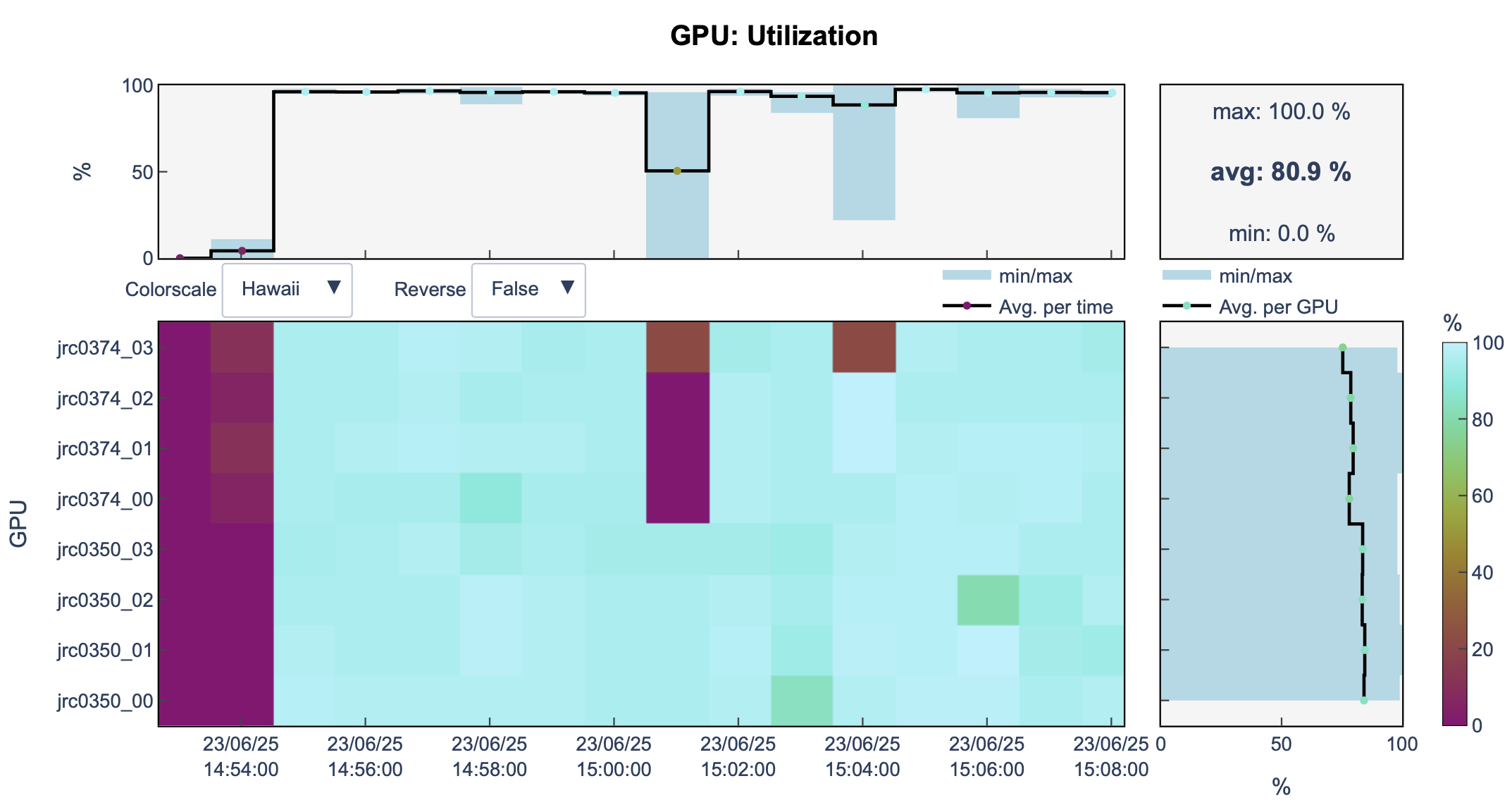
FSDP
- FSDP is a built-in primitive in PyTorch for distributed training.
- It is highly memory efficient because it shards model parameters, gradients, and optimizer states across GPUs.
- This allows training of very large models (often >1B parameters) that wouldn’t fit in memory otherwise.
- However, FSDP relies on frequent communication between GPUs, so it requires a high-bandwidth interconnect (e.g., InfiniBand).
- On bandwidth-limited clusters, FSDP may become a bottleneck, and pipeline parallelism might be preferable.
That’s it for FSDP, now let’s move to another parallelization technique.
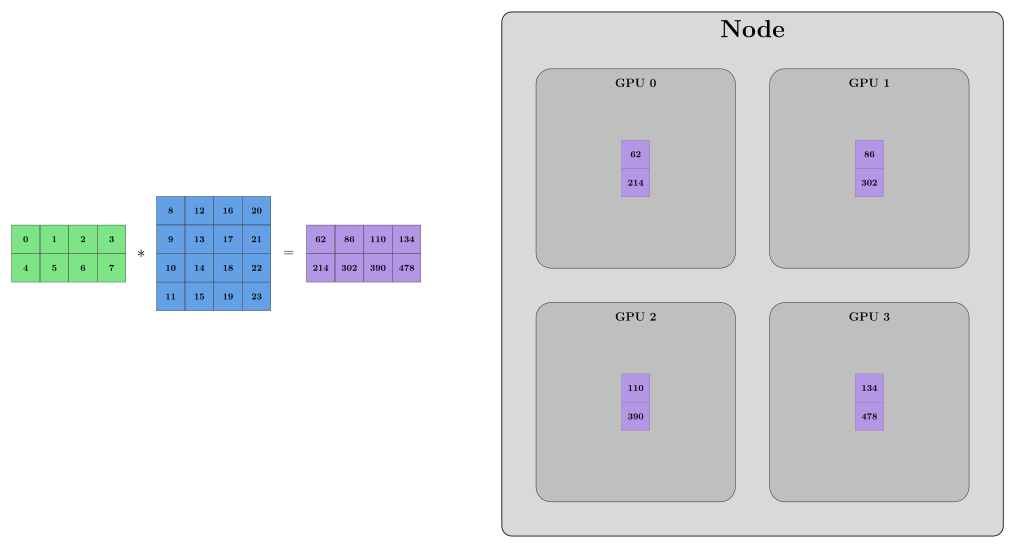
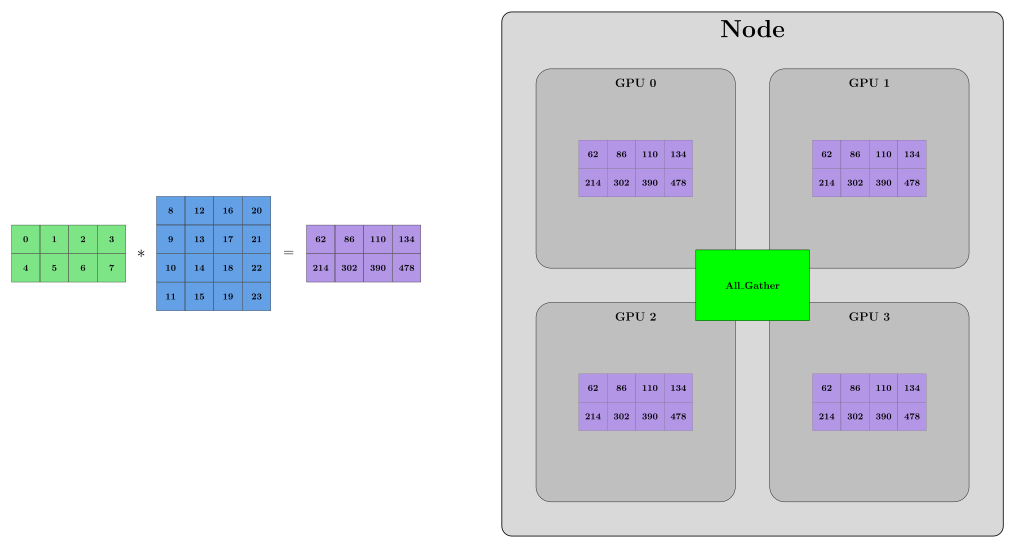
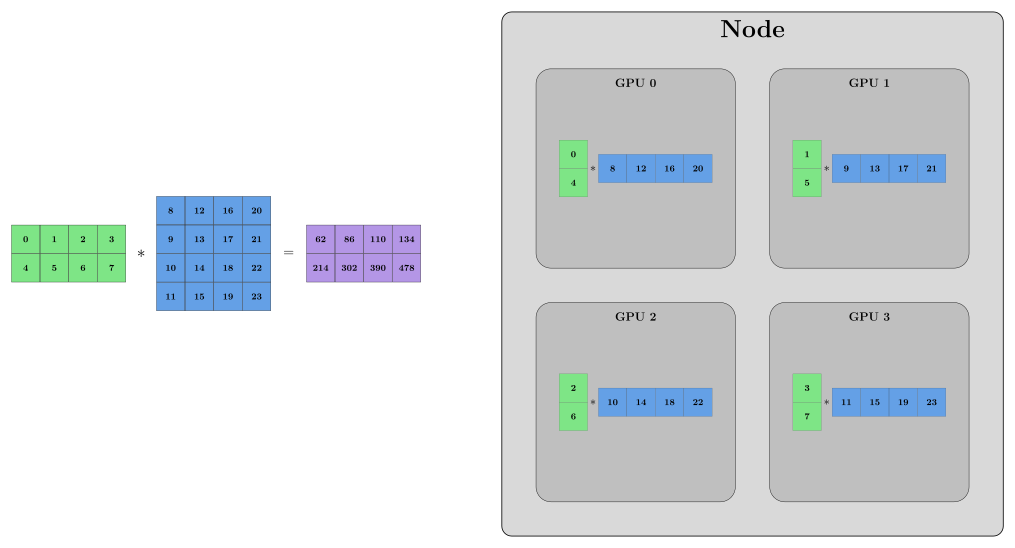
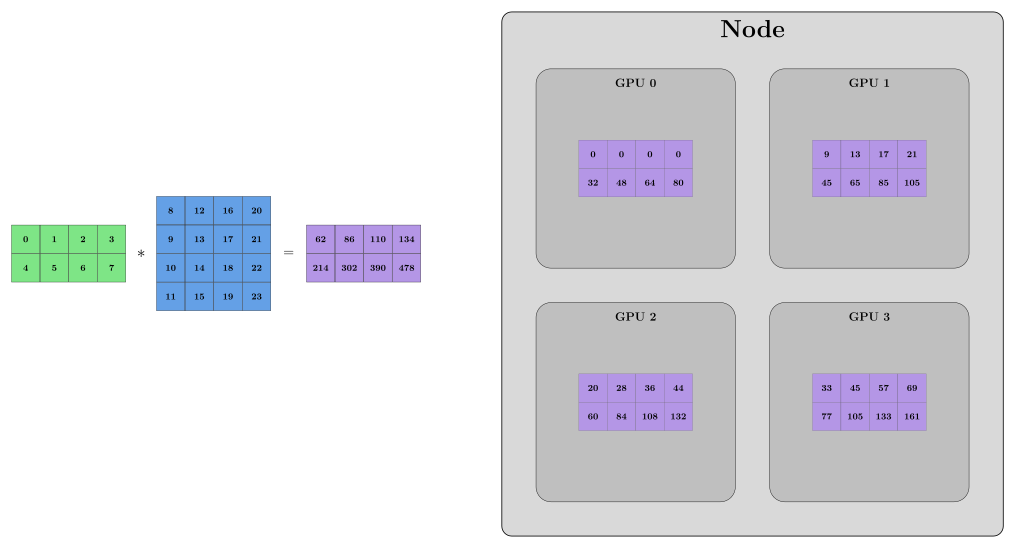
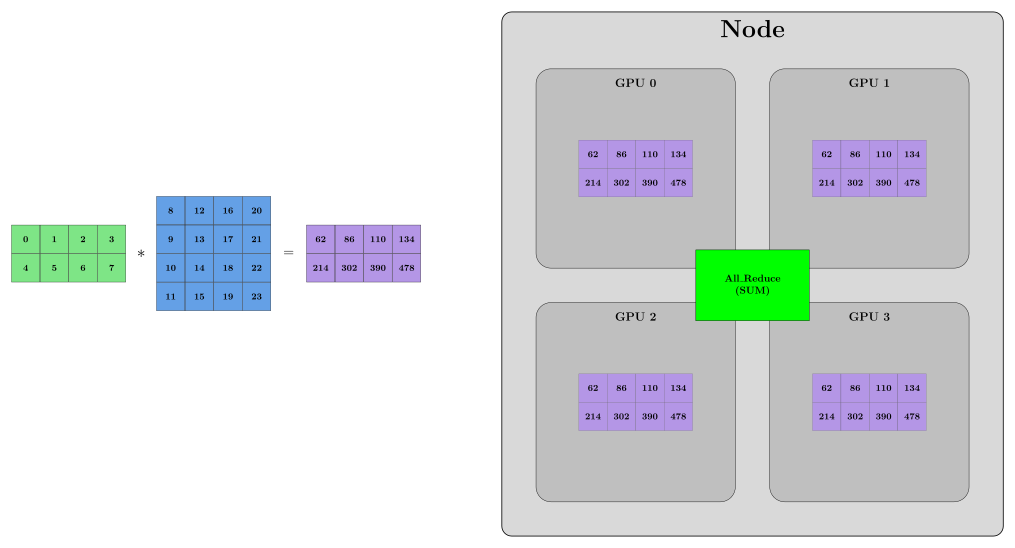
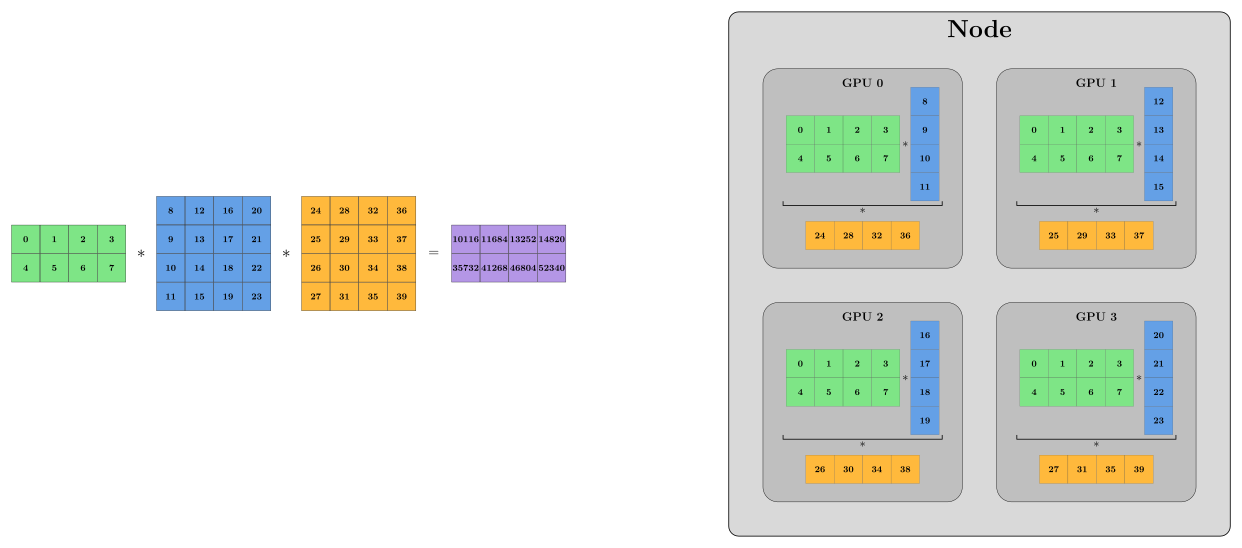
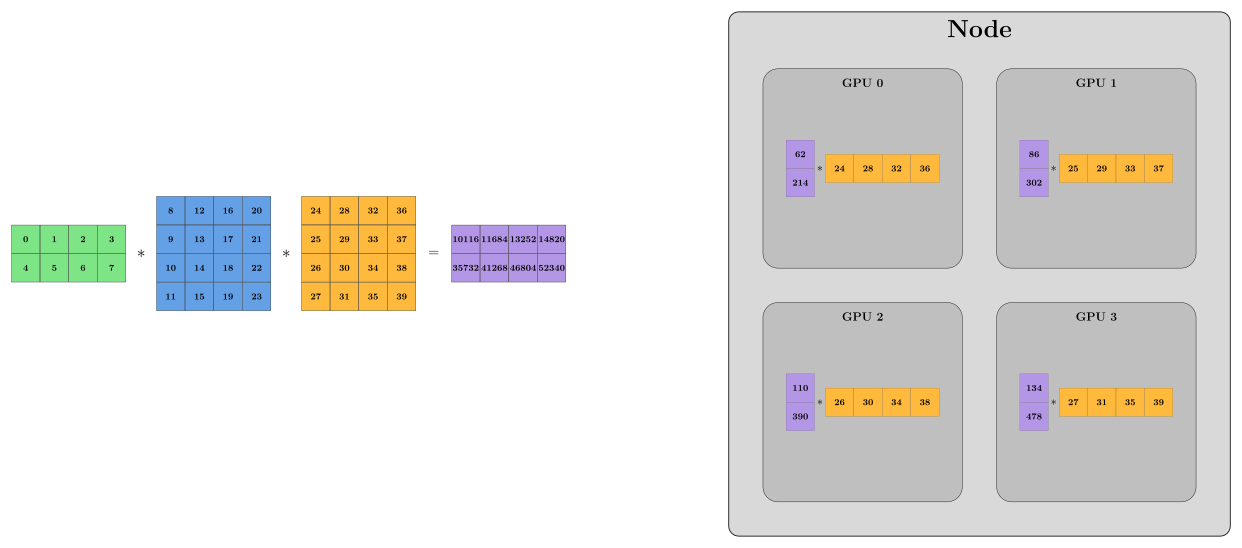
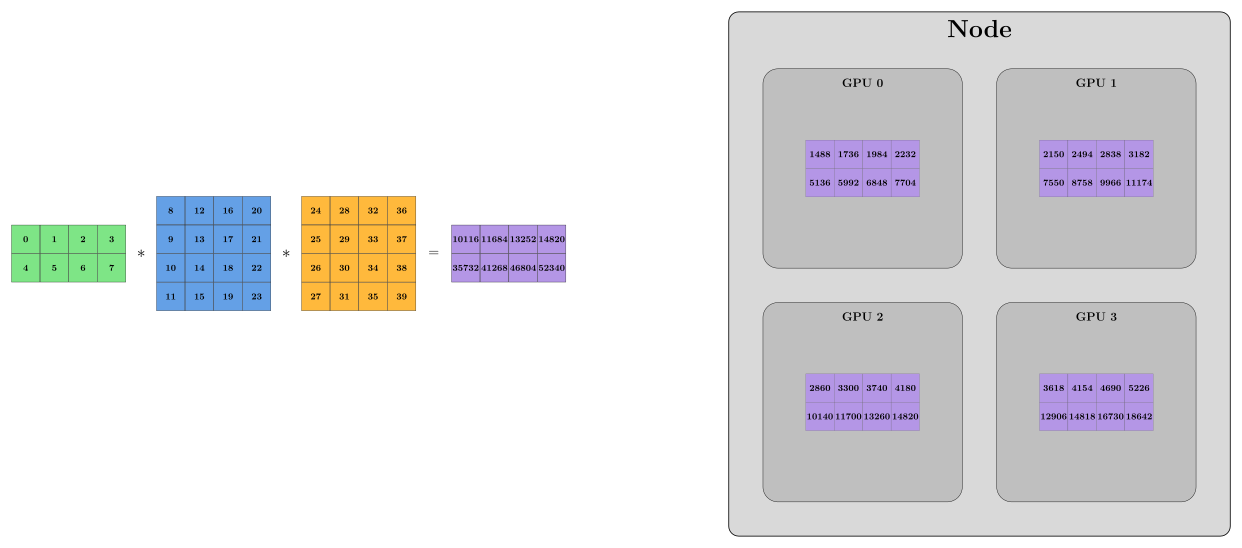
Tensor Parallelism (TP)
- Like FSDP, tensor parallelism is a sharding strategy.
- But unlike FSDP, it does not shard everything.
- It shards only the model parameters inside layers.
- Gradients and optimizer states are not sharded the way they are in FSDP.
- Tensor parallelism is especially useful when:
- A single layer — typically a large linear layer — is too big to fit on one GPU.
- Instead of splitting layers across time like FSDP, we split the tensor operations themselves across devices -> This is intra-layer parallelism.
TP: Column-wise Parallel
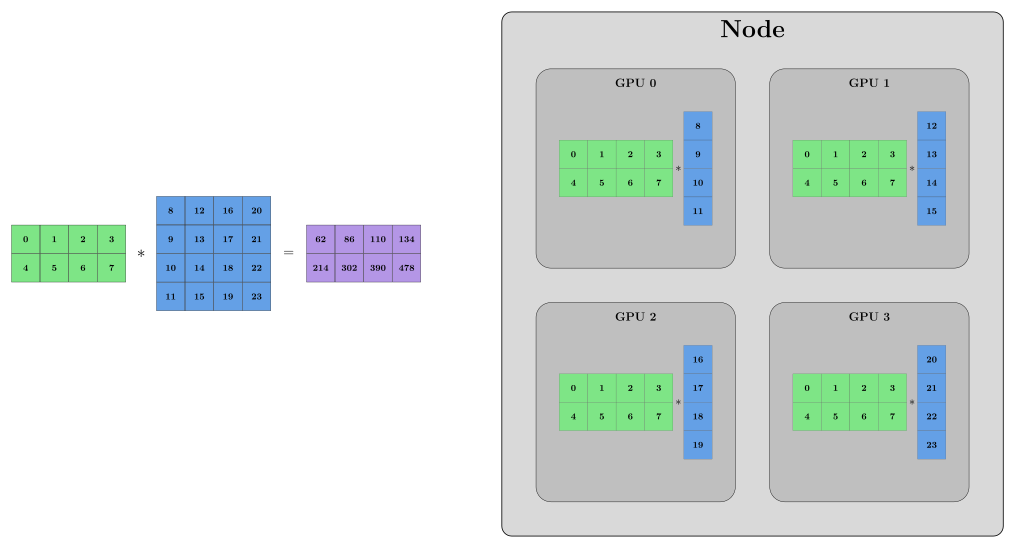
TP: Column-wise Parallel
TP: Column-wise Parallel
TP: Row-wise Parallel
TP: Row-wise Parallel
TP: Row-wise Parallel
TP: Combined Column- and Row-wise Parallel
TP: Combined Column- and Row-wise Parallel
TP: Combined Column- and Row-wise Parallel
TP: Combined Column- and Row-wise Parallel
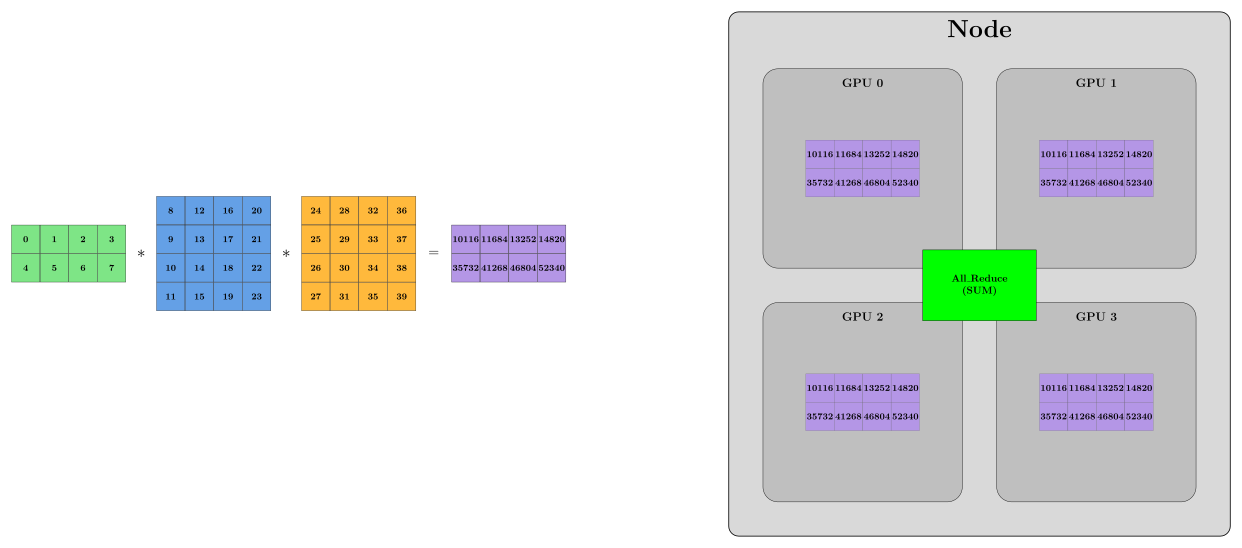
Minimal Code
import torch.nn as nn
from torch.distributed.device_mesh import init_device_mesh
from torch.distributed.tensor.parallel import (
    parallelize_module,
    ColwiseParallel,
    RowwiseParallel,
)

mesh = init_device_mesh("cuda", (world_size,))

model = nn.Sequential(
    nn.Linear(512, 1024),
    nn.ReLU(),
    nn.Linear(1024, 512)
).to(rank)

parallelize_module(model, mesh, {
    "0": ColwiseParallel(),
    "2": RowwiseParallel(),
})
TP
- TP is great for large, compute-heavy layers like matrix multiplications.
- However, TP requires frequent communication during tensor operations.
- If TP is not enough …..
Pipeline Parallelism (PP)
- Model itself is too big to fit in one single GPU 🐋
- Each GPU holds a slice of the model 🍕
- Instead of sending a single large batch through the model, it is split into micro-batches to keep all GPUs utilized.
- Data moves from one GPU to the next
PP

PP

PP

PP

PP

PP

PP

PP

PP

PP

PP

PP

PP

PP

PP

PP

PP

PP

PP

PP

Minimal Code
import torch
import torch.nn as nn
import torch.distributed as dist
from torch.distributed.pipelining import SplitPoint, pipeline, ScheduleGPipe

model = nn.Sequential(
    nn.Linear(512, 1024), nn.ReLU(),
    nn.Linear(1024, 1024), nn.ReLU(),
    nn.Linear(1024, 1024), nn.ReLU(),
    nn.Linear(1024, 512),
)

pipe = pipeline(model, mb_args=(torch.randn(8, 512),), split_spec={
    "2": SplitPoint.BEGINNING,
    "4": SplitPoint.BEGINNING,
    "6": SplitPoint.BEGINNING,
})

stage = pipe.build_stage(rank, device=torch.device("cuda", rank))
schedule = ScheduleGPipe(stage, n_microbatches=4)

if rank == 0:  # first stage gets input
    schedule.step(torch.randn(32, 512, device=torch.device("cuda", rank)))
elif rank == dist.get_world_size() - 1:  # last stage gets target (to compute loss)
    loss = schedule.step(target=torch.randn(32, 512, device=torch.device("cuda", rank)))
else:  # middle stages: no input / no target
    schedule.step()
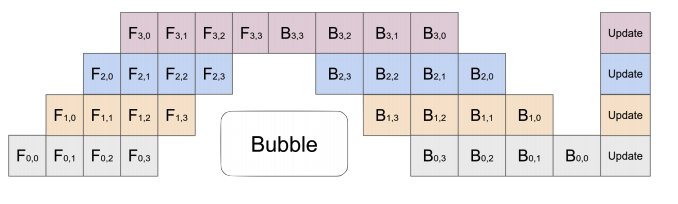
GPipe
- This method is called GPipe
- There’s an idle time - an unavoidable “bubble” 🫧
![]()
- Other schedules reduce this overhead, such as 1F1B and Zero-Bubble
When to use each parallelism strategy
| Strategy | What it does | Best when |
|---|---|---|
| DDP | Replicates the full model and splits data across GPUs | The model fits on one GPU |
| FSDP | Shards model states across GPUs | The model almost fits in memory |
| TP | Splits large layers across GPUs | A single layer is too large |
| PP | Splits the model into layer stages across GPUs | The model is very deep |
3D Parallelism
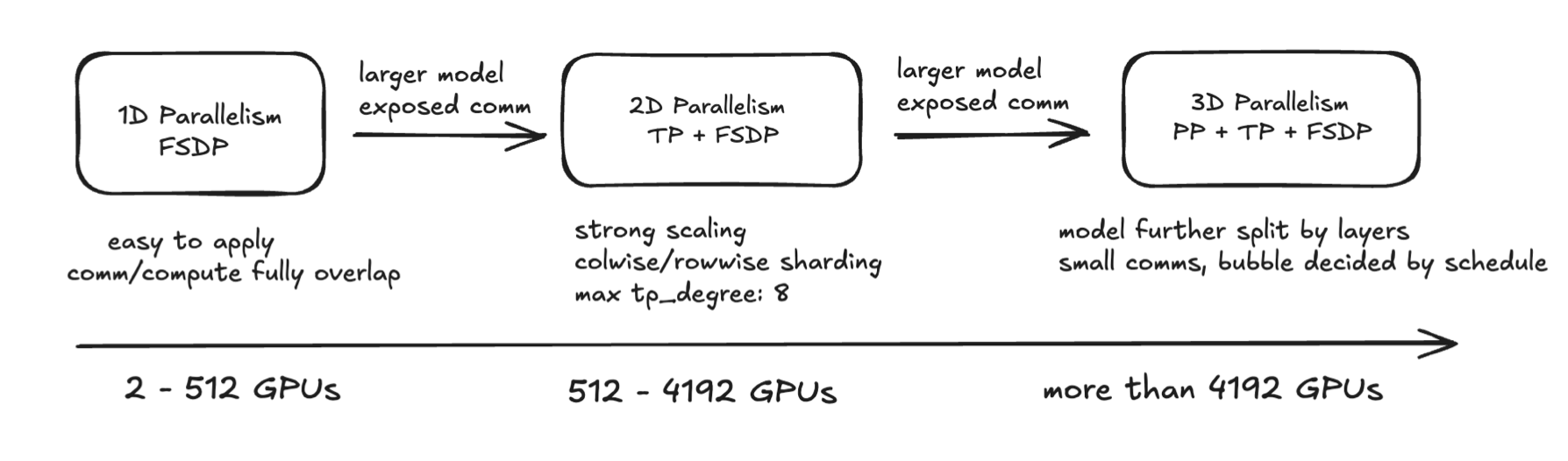
- 3D Parallelism combines Tensor Parallelism (TP), Pipeline Parallelism (PP), and Data Parallelism (DP) to efficiently train large models by distributing computation, memory, and data across multiple GPUs.
- It enables scaling to very large models by addressing compute, memory, and communication bottlenecks in a balanced way.
Day 2 RECAP
- You know where to store your code and your data. 🗂️📄
- You know what distributed training is. 🧑💻
- You can submit training jobs on a single GPU, multiple GPUs, or across multiple nodes. 🎮💻
- You are familiar with DDP and FSDP and aware of other distributed training techniques like TP, PP, and 3D parallelism. 💡
- You know how to monitor your training using llview. 📊👀
Find Out More
Here are some useful: